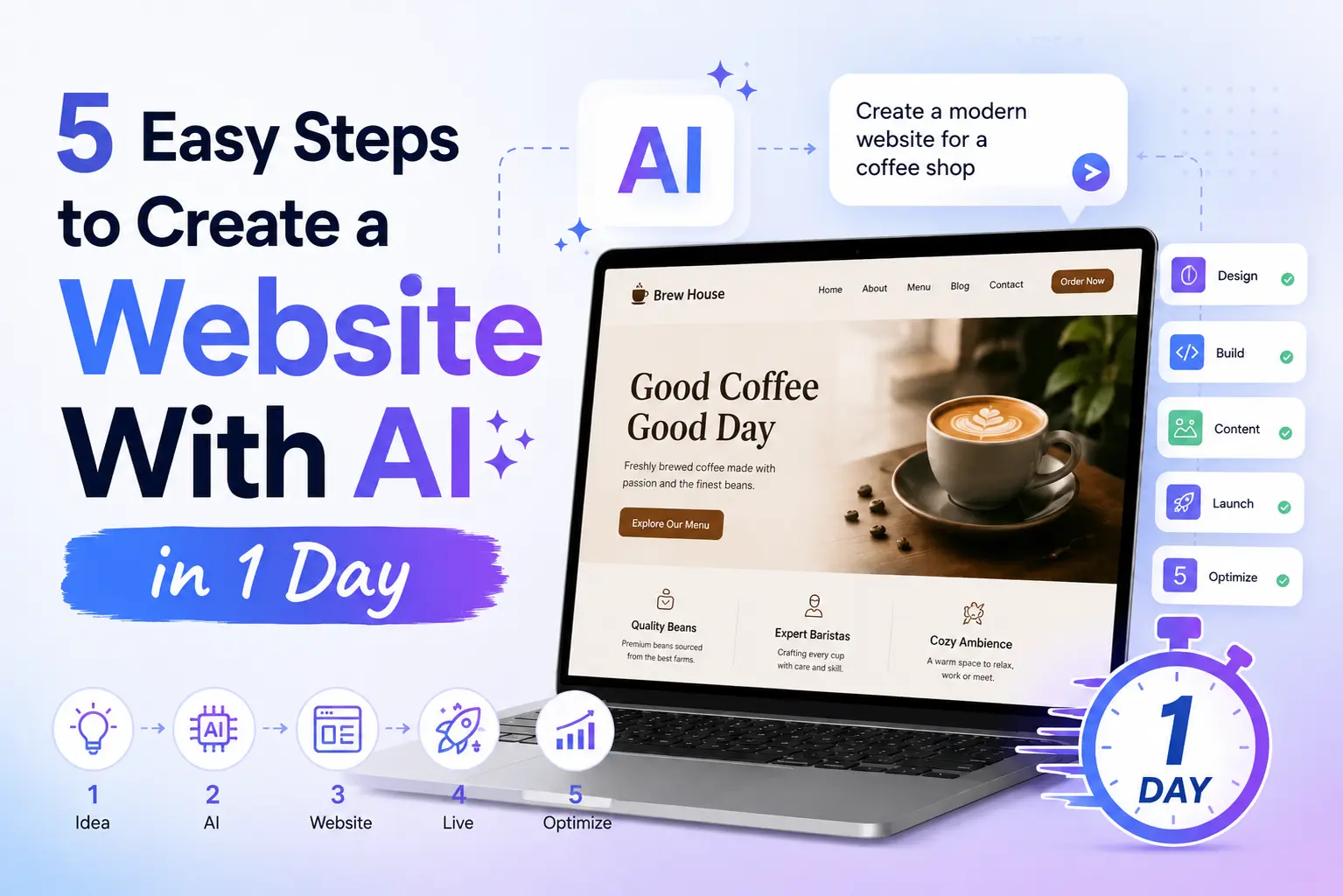
5 Easy Steps to Create a Website With AI in 1 Day (Real Expert Workflow)
Learn how to create a website with AI in just 1 day using 5 easy steps. Build a fast, SEO-friendly, professional website without coding.
**Introduction**
A few years ago, building a website meant spending weeks designing layouts, coding pages, fixing bugs, setting up hosting, and optimizing everything manually.
Today, AI has changed the workflow completely.
For Learn About: Integrate AI Into Human Workflows, Click Here!
Now you can:
- Generate UI/UX with AI
- Build pages faster
- Use AI coding assistants
- Deploy automatically with GitHub and Vercel
- Launch a professional website in a single day
And no — this is not one of those fake “build a million-dollar app in 10 minutes” articles.
This guide is based on the exact workflow we use to build real AI-powered websites for startups, SaaS businesses, service companies, and MVP launches.
I’ll show you:
- The tools we actually use
- The mistakes beginners make
- Pro tips that save hours
- How to deploy properly
- How to make the website SEO-friendly from day one
If your goal is:
Launching a startup quickly often involves validating an idea, creating a SaaS MVP, or building an AI business website.
this workflow works extremely well.
**Why AI Website Development Is Growing So Fast**
Most people think AI replaces developers.
That’s not true.
What AI actually does is remove repetitive work.
Instead of spending:
The process typically involves spending 8 hours designing wireframes, followed by 2 days coding layouts, and then 1 day setting up deployment.
you can now automate large parts of the process.
The real advantage is speed, as businesses that launch faster can test ideas more quickly, rank earlier on Google, collect leads sooner, and improve their products at a faster pace. This is why startups are increasingly adopting AI-assisted development workflows to accelerate their growth and iteration cycles.
If you want to learn about: 5 Costly Red Flags When Hiring an AI Specialist in 2026 , Click Here!
**The Exact 5-Step Workflow We Use**
Here’s the simplified version of the workflow:
Step what we do
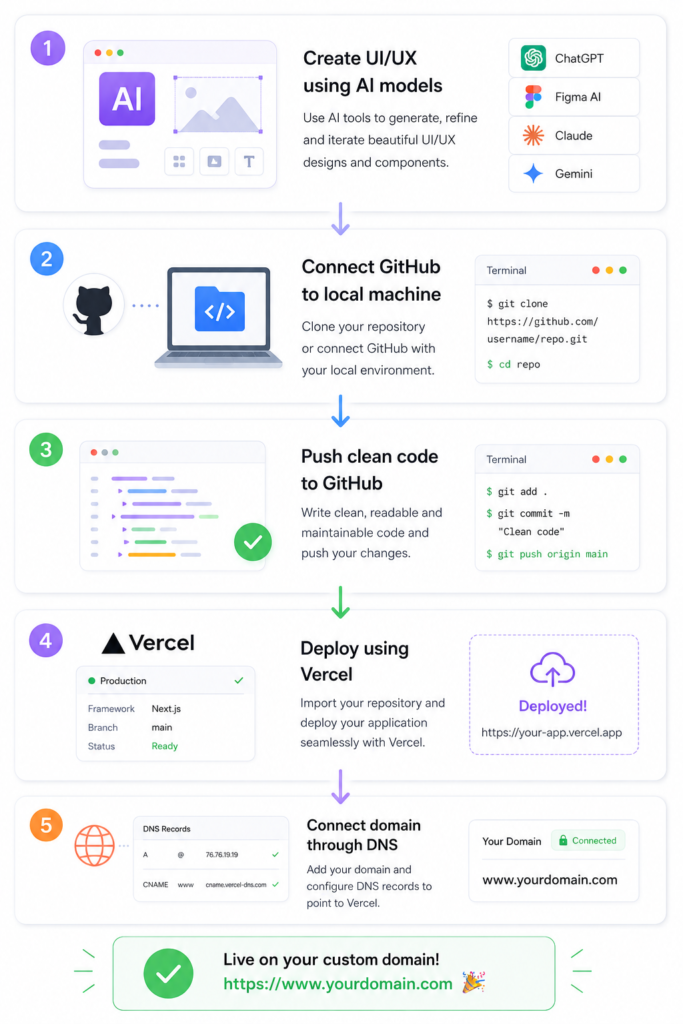
**Step 1: Create the UI/UX Using AI Models**
This is where most of the speed comes from.
Instead of starting from a blank screen, we use AI tools to generate:
This includes creating layouts, landing pages, dashboard concepts, SaaS interfaces, mobile responsiveness, and innovative component ideas.
One workflow we often use is generating UI/UX concepts through Anti-Gravity AI models and then refining the design manually.
**Pro Tip: Don’t Trust AI Design Completely**
This is one of the biggest beginner mistakes.
AI can generate attractive designs, but many outputs:
Many designs still suffer from poor spacing, weak UX flow, inconsistent mobile layouts, or terrible conversion structure.
Professionals use AI as a starting point — not the final product.
The best workflow is:
The process typically involves generating the initial structure with AI, improving the layout manually, optimizing the experience for users, and refining the site for SEO performance.
That combination creates websites that actually perform.
If you want to learn about: AI MVP: What to Build First?, Click Here!
**What Makes an AI Website Look Professional?**
A professional AI website usually has:
- clean typography,
- strong CTA buttons,
- proper spacing,
- fast loading speed,
- mobile responsiveness,
- simple navigation,
- clear messaging.
Most visitors decide within seconds whether they trust your website.
Good UI directly affects:
- SEO,
- conversions,
- bounce rate,
- and lead generation.
**Want an AI Website Built Professionally?**
If you want a production-ready AI website, SaaS MVP, or startup landing page without spending weeks debugging:
**Step 2: Connect GitHub With Your Computer**
After creating the website, the next step is setting up version control.
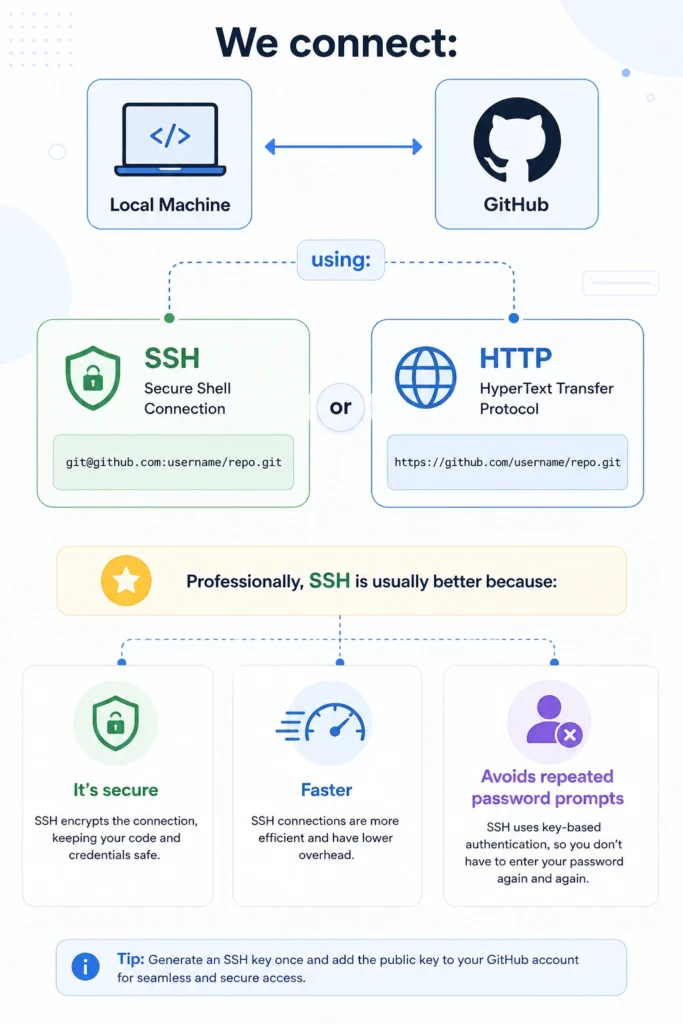
**Why GitHub Is Important**
GitHub is not just for storing code.
It helps with:
It helps with backups, collaboration, deployment, version tracking, and rollback protection. Without GitHub, deployment becomes messy very quickly.
**Pro Tip: Organize Your Repository Properly**
One thing experienced developers always do: Keep repositories clean.
That means:
- proper folder structure,
- readable file names,
- removing unnecessary assets,
- using .gitignore.
A messy repository creates deployment problems later.
If you want to learn about: AI Chatbot Development Cost in 2026, Click Here!
**Step 3: Push the Code to GitHub**
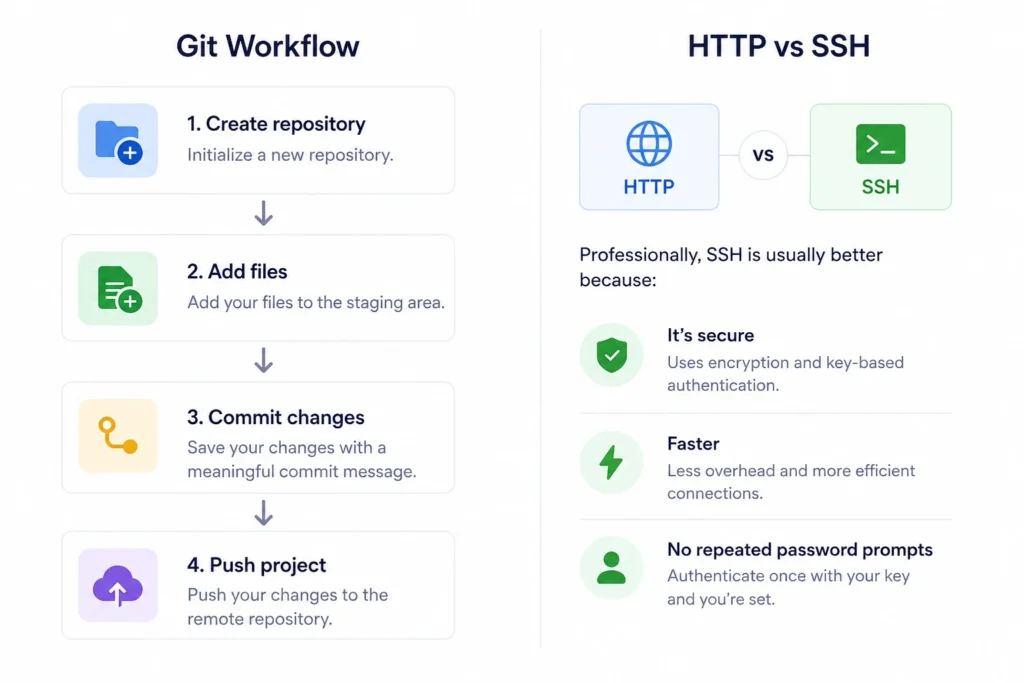
But here’s a critical security mistake many beginners make:
Uploading it publicly can expose your entire project.
**NEVER Upload Your .env File**
Your .env file may contain:
- API keys,
- database credentials,
- AI model secrets,
- private tokens.
**Pro Tip: Use Environment Variables Correctly**
Professional deployment workflows always separate:
- frontend code
- secret credentials
This makes your project:
- safer,
- cleaner,
- easier to scale.
**Step 4: Deploy the Website Using Vercel**
This is the step where your website goes live.
After pushing code to GitHub:
- Create a Vercel account
- Connect GitHub
- Import repository
- Click deploy
That’s it.
Vercel automatically:
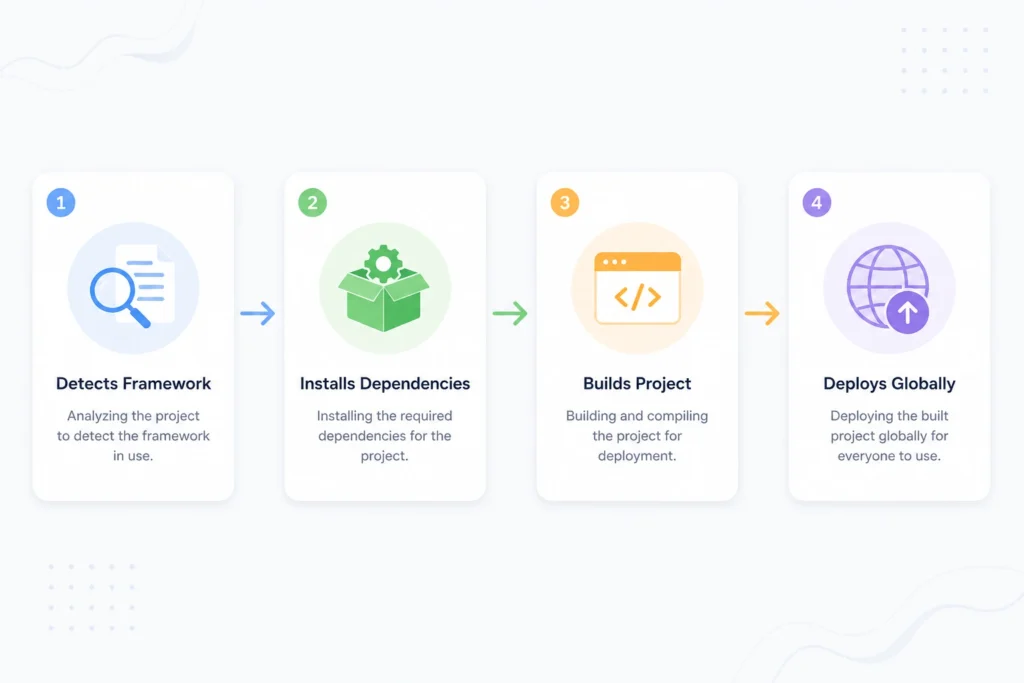
For modern AI websites, this workflow is incredibly fast.
**Why Most AI Developers Prefer Vercel**
| Feature | Developers Prefer Vercel |
|---|---|
| GitHub integration | One-click deployment |
| Fast hosting | Better SEO |
| Global CDN | Faster loading |
| SSL support | Secure websites |
| Auto deployments | Easy updates |
Speed matters a lot for SEO. Google now heavily considers:
- Core Web Vitals,
- mobile performance,
- user experience.
Slow websites lose rankings.
**Pro Tip: Test Mobile Version BEFORE Deployment**
Many AI-generated designs look good on desktop but break on mobile.
Always test:
- buttons,
- navigation,
- text spacing,
- responsiveness,
- image scaling.
More than half of your visitors may come from mobile devices.
**Step 5: Connect Your Domain With DNS**
After deployment:
- Connect your custom domain.
Usually you:
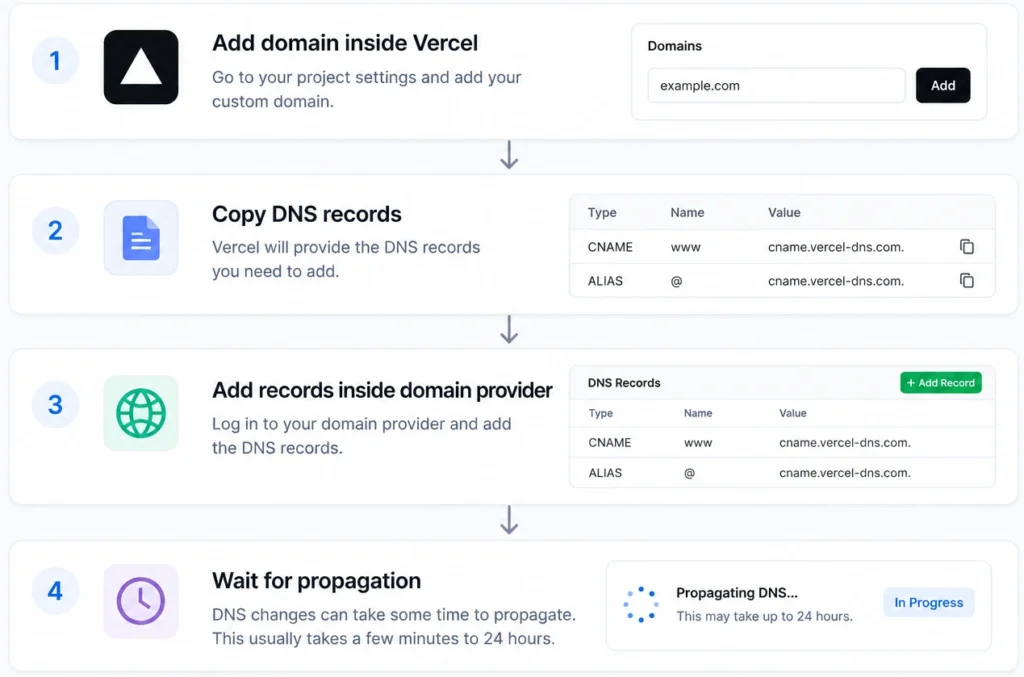
Normally this takes:
- a few minutes,
- sometimes several hours.
**Common Problems Beginners Face**
| Problem | Real Solution |
|---|---|
| Deployment fails | Check build logs |
| GitHub connection issues | Reconfigure SSH |
| Website breaks on mobile | Improve responsive design |
| Slow website | Optimize images |
| DNS not working | Wait for propagation |
These problems are normal. Even experienced developers face them. The key difference is knowing how to troubleshoot quickly.
**How to Make Your AI Website Rank on Google**
Creating the website is only half the work. The next step is getting traffic.
Most AI-generated websites fail because:
- content is generic,
- pages are thin,
- UX is weak,
- SEO structure is poor.
**Pro SEO Tips From Real AI Website Projects**
**1\. Focus on Search Intent**
Don’t just target keywords.
Example:
Instead of stuffing:
“AI website builder”
answer:
“How can someone build an AI website quickly without coding experience?”
Google understands intent better now.
**2\. Add Real Experience**
Google’s Helpful Content System rewards experience-based content.
That’s why tutorials with:
- real workflows,
- screenshots,
- mistakes,
- lessons learned,
perform much better.
**3\. Structure Content for AI Overviews**
AI search systems prefer:
- short answers,
- clear formatting,
- tables,
- FAQs,
- direct explanations.
That’s why this article uses:
- simple language,
- clean headings,
- easy structure.
**4\. Improve Topical Authority**
Create related content around:
- AI development
- SaaS workflows
- AI automation
- deployment tutorials
- startup tech guides
Real Expert Advice Most Beginners Never Hear
AI helps speed up development.
But the real skill is:
- understanding users,
- solving real problems,
- creating clean UX,
- building trust.
A website that looks “AI-generated” usually performs poorly.
The best AI websites still feel:
- human,
- clean,
- useful,
- trustworthy.
That’s what converts visitors into leads.
**FAQ**
Can I really create a website with AI in one day?
Yes. With modern AI tools, GitHub workflows, and platforms like Vercel, a basic professional website can be launched within a day.
What is the easiest way to deploy an AI website?
The easiest workflow is:
-> build locally,
-> push to GitHub,
-> connect repository to Vercel,
-> deploy automatically.
Do I need coding knowledge to build an AI website?
Basic understanding helps, but AI tools significantly reduce the amount of manual coding required.
Is Vercel good for AI startup websites?
Yes. Vercel is widely used for:
-> startup MVPs,
-> AI SaaS products,
-> Next.js applications,
-> modern web apps.
What should I avoid when creating AI websites?
Avoid:
-> copying AI output blindly,
-> poor mobile design,
-> uploading secret files,
-> slow-loading pages,
-> generic content.
**Launch Your AI Website Faster**
If you want a modern AI website, a SaaS MVP, an AI startup landing page, a chatbot platform, or a full AI web application built professionally with scalable deployment workflows, this approach provides a strong foundation for fast and reliable development.
**Conclusion**
AI has completely changed website development. What once required weeks of work can now be done in a single day with the right workflow. But speed alone is not enough.
The websites that actually succeed are the ones that combine:
- AI efficiency,
- good UX,
- clean deployment,
- strong SEO,
- and real user value.
Use AI to accelerate the process not replace thinking. That’s the real professional approach to building websites with AI in 2026.
If you want to learn about: AI Agents for Small Businesses, Click Here!
AI Tools for Reducing Operational Costs in Restaurants: 11 Smart Solutions That Increase Profit Margins
Discover best AI tools for reducing operational costs in restaurants. Cut waste, automate tasks, improve efficiency, and increase profits.
Read Full GuideKey Takeaways & Common Questions
Can I really create a website with AI in one day? ▼
Yes. With modern AI tools, GitHub workflows, and platforms like Vercel, a basic professional website can be launched within a day.
What is the easiest way to deploy an AI website? ▼
The easiest workflow is: <br><strong>-></strong> build locally, <br><strong>-></strong> push to GitHub, <br><strong>-></strong> connect repository to Vercel, <br><strong>-></strong> deploy automatically.
Do I need coding knowledge to build an AI website? ▼
Basic understanding helps, but AI tools significantly reduce the amount of manual coding required.
Is Vercel good for AI startup websites? ▼
Yes. Vercel is widely used for: <br><strong>-></strong> startup MVPs, <br><strong>-></strong> AI SaaS products, <br><strong>-></strong> Next.js applications, <br><strong>-></strong> modern web apps.
What should I avoid when creating AI websites? ▼
<strong>Avoid: </strong><br><strong>-></strong> copying AI output blindly, <br><strong>-></strong> poor mobile design, <br><strong>-></strong> uploading secret files, <br><strong>-></strong> slow-loading pages, <br><strong>-></strong> generic content.
Discuss your AI project with our team
Reach out to our independent research team for scoping reviews, vendor evaluations, or feedback.
Continue Reading
Handpicked research and implementation guides to deepen your understanding.

AI Tools for Reducing Operational Costs in Restaurants: 11 Smart Solutions That Increase Profit Margins
Discover best AI tools for reducing operational costs in restaurants. Cut waste, automate tasks, improve efficiency, and increase profits.
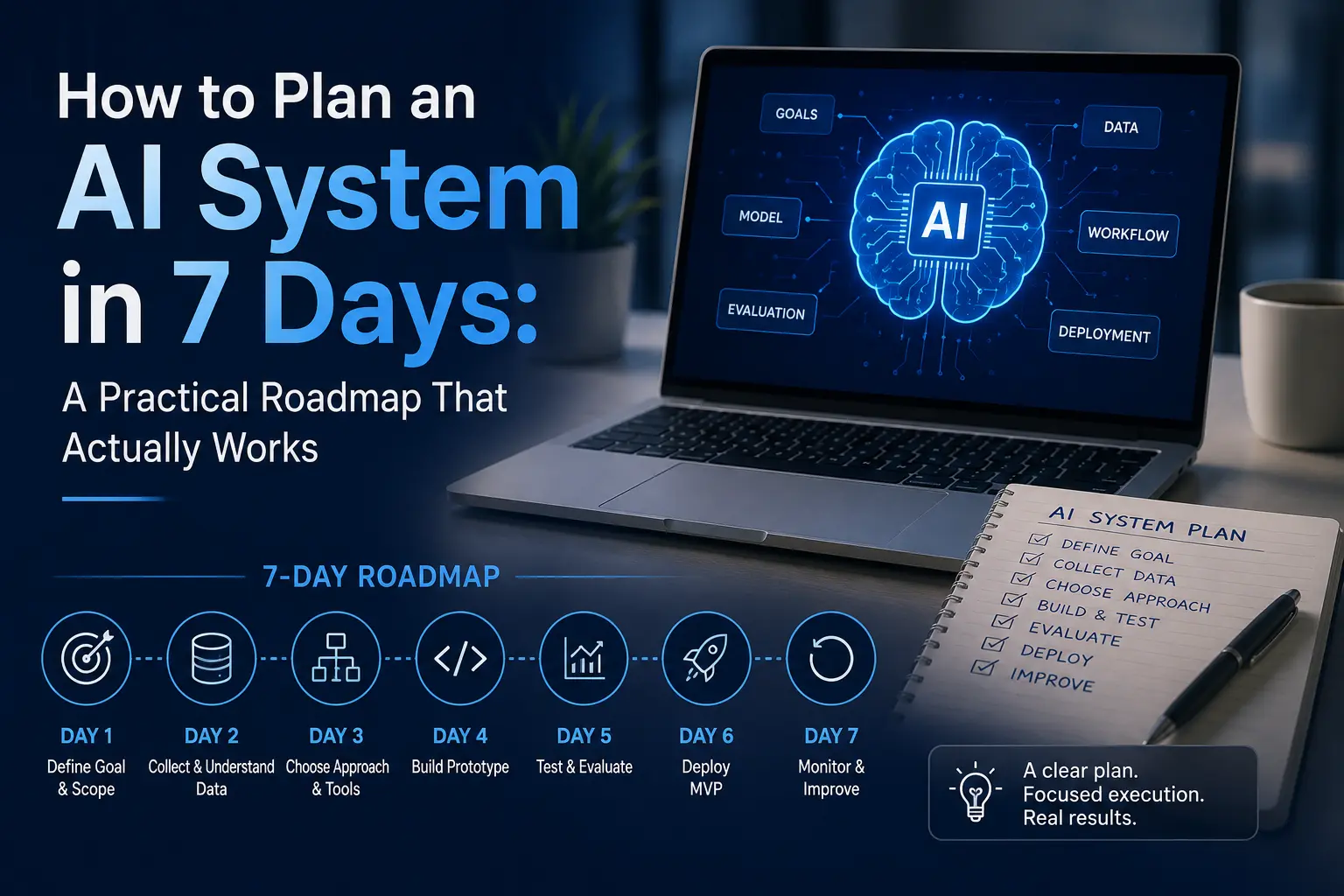
How to Plan an AI System in 7 Days: A Practical Roadmap That Actually Works
Planning AI system in a week is realistic if you follow the right order. This guide walks you through a practical, expert-tested 7-day AI planning roadmap.