Why Business AI Projects Fail After the Demo (And How to Fix Them)
Many business AI projects work in demos but fail in production. Discover the real causes and a practical framework for building reliable AI systems.
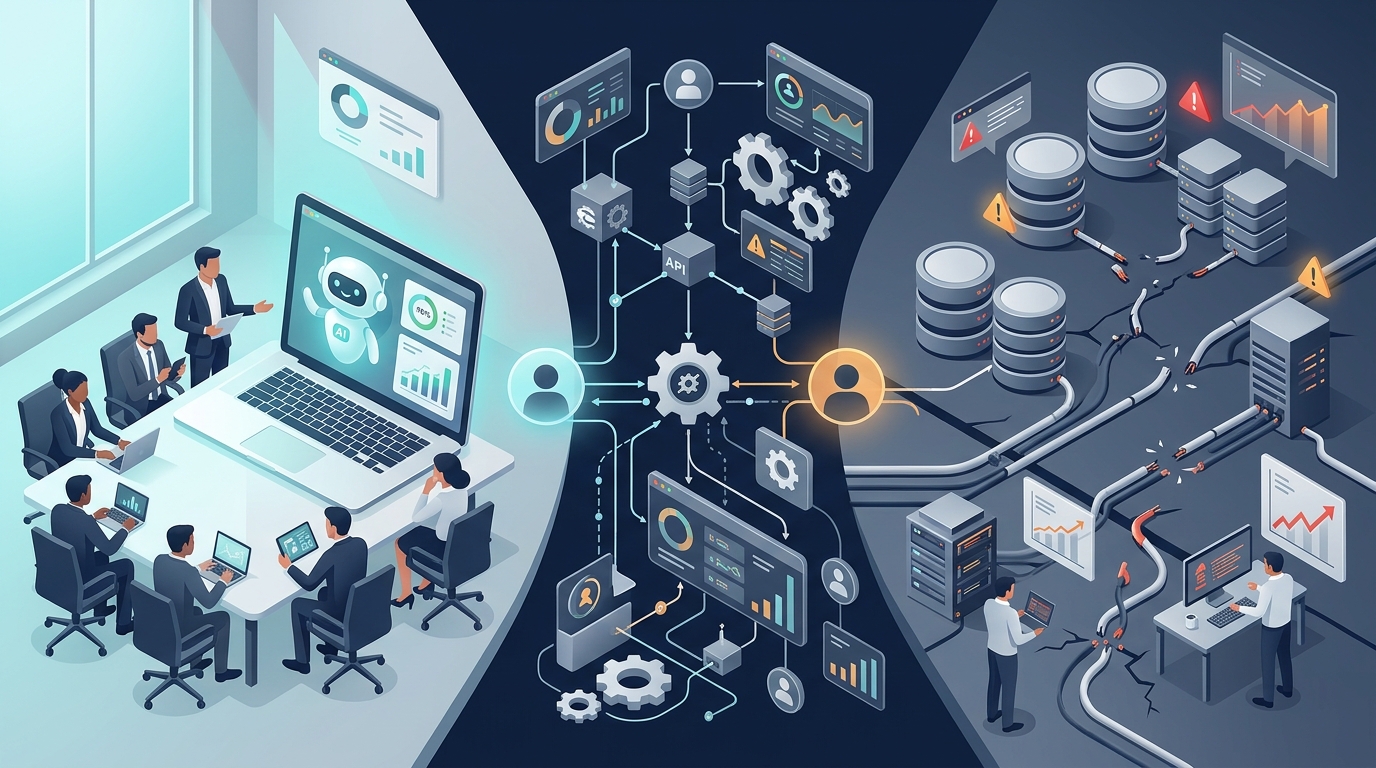
Your AI chatbot just answered 20 questions correctly in a demonstration.
Your team is impressed. Management is excited. The developer says the prototype is ready. Everyone starts imagining how much time and money the business will save.
Then you connect it to real customers, actual company data, and your existing software.
Suddenly, things change.
The chatbot gives incorrect answers. Customer records are outdated. The system cannot access the information it needs. API costs increase. Employees stop trusting its responses. Your team starts manually checking almost everything the AI produces.
Three months later, the project is still a prototype.
The problem wasn't necessarily the AI model. The problem was that your team built a successful demonstration without proving that the complete system could operate reliably inside the business.
This is one of the biggest challenges in business AI implementation: moving from an impressive proof of concept to a reliable production system.
A successful AI demonstration proves that something is technically possible. It does not automatically prove that it is useful, secure, affordable, scalable, or reliable enough for everyday business operations.
In this guide, we'll explain why business AI projects fail after the demo, what companies commonly overlook, and how to move from experimentation to a production-ready AI solution.
The Short Answer: Why Do Most Business AI Projects Fail After the Demo?
Business AI projects often fail after demonstrations because the prototype is tested under controlled conditions that do not represent real business operations.
The most common reasons include:
- The project does not solve a clearly defined business problem.
- The AI depends on incomplete, outdated, or poorly structured data.
- The system is not integrated into existing business workflows.
- The team tests impressive examples instead of real-world edge cases.
- Security, privacy, and human oversight are considered too late.
- API, infrastructure, and maintenance costs are underestimated.
- Employees do not trust or adopt the system.
- Nobody owns the system after deployment.
The solution is to treat AI as a complete business system, not simply a model or chatbot. A production-ready system needs reliable data, integrations, testing, monitoring, security, human oversight, and measurable business outcomes.
1. The Difference Between an AI Demo and a Production System
An AI demo and a production AI system may look identical on the screen. However, they have very different responsibilities.
A demo is designed to demonstrate an idea. A production system must deliver consistent results under real operating conditions.
Consider a business that wants to automate customer support.
During the demonstration:
- A developer prepares a small collection of frequently asked questions.
- The chatbot answers questions using selected documents.
- The developer tests a few common scenarios.
- The answers look accurate.
- Management approves the concept.
After deployment:
- Customers ask questions that were never included in the demonstration.
- Product information changes.
- Customers provide incomplete information.
- The chatbot needs to retrieve current order information.
- Some questions require access to private customer records.
- The system must recognize when it does not know an answer.
- Support agents need to take over complicated cases.
- Every interaction creates operational and API costs.
The original demonstration never proved that the system could handle these responsibilities.
Demo vs. Production: What's Actually Different?
| Area | AI Demo / Prototype | Production AI System |
|---|---|---|
| Data | Small, prepared dataset | Real, changing business data |
| Users | Developers and selected testers | Employees or actual customers |
| Accuracy | A few successful examples | Consistent performance across many scenarios |
| Integration | Often isolated | Connected to business applications |
| Security | Basic or limited testing | Defined access controls and security policies |
| Cost | Small experimental usage | Measured ongoing operating costs |
| Monitoring | Manual observation | Continuous performance monitoring |
| Errors | Developers can correct manually | Defined recovery and escalation procedures |
| Ownership | Project developer | Assigned business and technical owners |
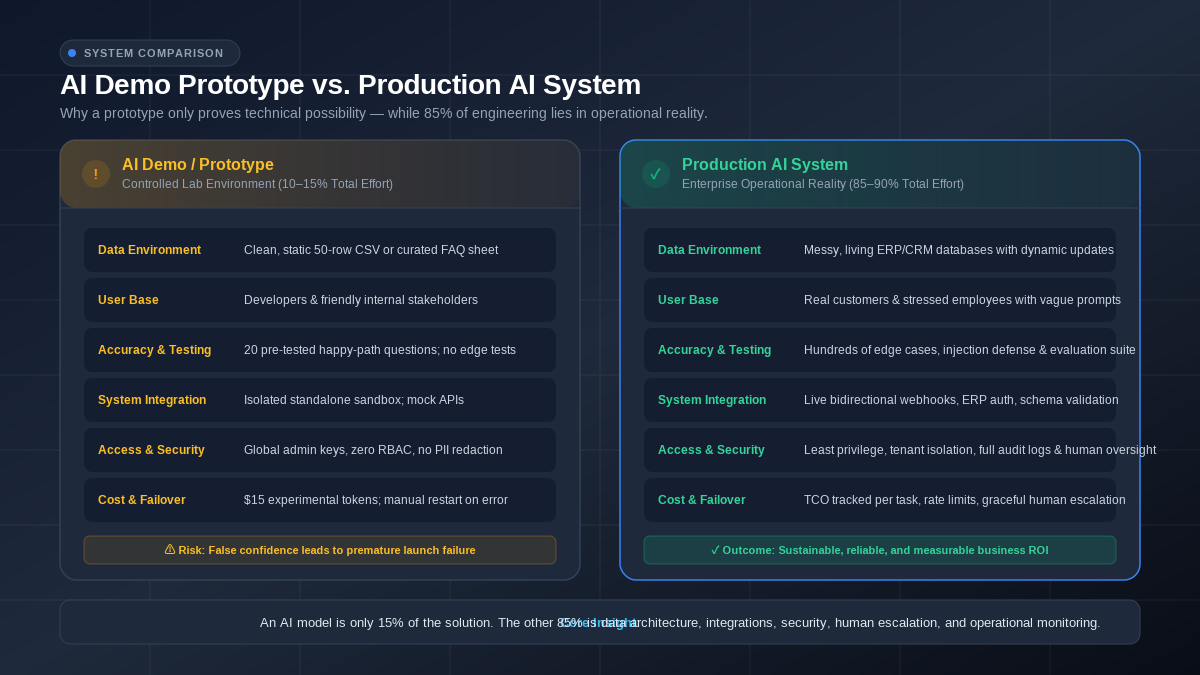
The Key Lesson: A successful demonstration proves that an AI capability can work. Production testing proves that the complete business system can work reliably.
2. Seven Reasons Business AI Projects Fail After the Demo
Let's examine the problems that commonly turn promising AI projects into expensive experiments. According to Gartner's research on generative AI failures, at least 50% of GenAI projects are abandoned after proof of concept due to poor data quality, inadequate risk controls, escalating costs, and unclear business value.
Reason 1: The Team Starts With AI Instead of a Business Problem
One of the most common mistakes is starting a project with a technology decision.
For example:
- "We need an AI chatbot."
- "We should build an AI agent."
- "We need to use the latest language model."
But these statements do not explain what the business actually needs to improve.
A company might spend months developing an AI chatbot without determining whether its real problem is slow customer response, repetitive support tickets, inaccurate product information, or a disconnected customer database. If you are evaluating whether machine intelligence is truly necessary for your use case, review our strategic guide on When Should I Use AI vs. When Should I Skip It?.
Without a clear business objective, the team can deliver a technically impressive product that creates little measurable value.
How to Fix It
Define the business problem before selecting the model or development platform. Use this simple framework:
- Problem: What is currently going wrong?
- Users: Who experiences the problem?
- AI responsibility: What specific task should AI perform?
- Expected outcome: What should improve?
- Success metric: How will the business measure the improvement?
| Item | Practical Implementation Example |
|---|---|
| Business problem | Support agents spend too much time answering repetitive questions |
| Users | Customer support team |
| AI responsibility | Retrieve approved answers and draft responses |
| Expected outcome | Reduce time spent on repetitive inquiries |
| Success metrics | Average handling time, answer accuracy, and customer satisfaction |
Notice the difference. The objective is no longer simply to build a chatbot. It is to improve a measurable business process. Before approving development, establish a baseline. If you do not know how the process performs today, you will struggle to prove whether AI improved it.
Practical Advice: Do not approve an AI project simply because the technology looks impressive. Approve it because the business problem is important and the proposed solution has a measurable outcome.
Reason 2: The AI Works With Demo Data but Fails With Real Business Data
A prototype often uses clean, organized, and carefully selected information. Real business data is rarely that convenient. As IBM's study on enterprise AI scaling notes, data fragmentation and governance bottlenecks represent the primary reason enterprise pilots stall before reaching scale.
Real business data may be:
- Stored across different applications.
- Duplicated across spreadsheets.
- Missing important fields.
- Written in inconsistent formats.
- Outdated or contradictory.
- Restricted by user permissions.
- Spread across PDFs, emails, databases, and documents.
Imagine building an AI assistant for a company that answers questions about product availability. During the demo, the developer uploads a spreadsheet containing 100 products. The AI answers: "Is Product A available?" — "Yes, Product A is in stock."
The demonstration looks successful. But the real inventory is maintained in an ERP system, and the spreadsheet is updated only once a week. The AI may confidently tell customers that a product is available even when it has already sold out. The model is not necessarily malfunctioning; it is working with information that does not reflect current business reality.
How to Fix It
Perform a data readiness assessment before moving into production.
| Data Readiness Question | What to Check & Verify |
|---|---|
| Availability | Does the required information exist in an accessible digital format? |
| Accuracy | Is the information correct, vetted, and validated by domain experts? |
| Freshness | How frequently is it updated, and does the AI access live synchronization? |
| Consistency | Do different business systems use identical field definitions and IDs? |
| Access | Can the AI retrieve the information reliably through authenticated APIs? |
| Permissions | Is the system authorized to access this information under tenant isolation rules? |
| Ownership | Who is specifically responsible for maintaining and updating the underlying data? |
For AI systems that answer questions from internal documents, a retrieval-augmented generation (RAG) architecture may help. RAG retrieves relevant information from an approved knowledge source and provides it to the language model as context. This can improve the grounding of answers, but it does not automatically guarantee accuracy. Retrieval quality, document freshness, access permissions, and answer evaluation still matter.
For systems that need current business information, connect to the appropriate source of truth rather than relying on manually uploaded snapshots.
Practical Advice: Before asking whether your AI model is intelligent enough, ask whether it has access to the right information at the right time.
Reason 3: The AI Is Not Connected to the Actual Business Workflow
An AI tool can generate useful answers and still fail to deliver business value.
Why? Because generating an answer is not the same as completing a business task.
Consider an AI system that helps a sales team qualify incoming leads. The AI can read a customer inquiry, identify the product of interest, summarize the customer's requirements, estimate lead priority, and suggest a follow-up response.
But if the sales team still has to manually copy the information into the CRM, assign the lead, create a task, and send a follow-up email, much of the manual friction remains unchanged. The AI has produced an output, but it has not completed the workflow.
How to Fix It
Map the complete process before development. For example, an AI-powered lead qualification workflow should look like this:
- Inquiry Submission: A customer submits an inquiry on the website.
- Gateway Reception: The backend system receives the payload and authenticates the session.
- Information Extraction: AI extracts structured entities (intent, budget, company size, timeline).
- Validation: Business rules validate required fields and enforce syntax.
- Record Match: The system queries the CRM to check for an existing account.
- CRM Synchronization: The lead record is automatically created or enriched.
- Routing: The lead is assigned to the appropriate account executive based on geography or tier.
- Task Creation: A follow-up task and notification are scheduled in the sales workspace.
- Human-in-the-Loop: High-value or ambiguous opportunities are flagged for immediate senior review.
Depending on the business, an AI application may need to connect with CRM platforms, ERP systems, inventory databases, customer support software, accounting applications, communication tools, and internal REST/GraphQL APIs.
The objective is not to add AI as another disconnected application. It is to place AI inside the process where it can genuinely reduce work.
Practical Advice: Measure how much of the original business task has actually been completed. Do not measure success only by the number of AI-generated responses.
Reason 4: The Team Tests the Demo Instead of Testing Real-World Situations
A prototype may be tested with 20 carefully selected questions. But real customers, employees, and business processes are unpredictable.
A production system will inevitably receive:
- Incomplete questions and missing parameters.
- Incorrect information (e.g. typos in invoice numbers or email addresses).
- Unexpected file formats and corrupted attachments.
- Conflicting documents (e.g. two price sheets with differing discount tiers).
- Duplicate requests submitted simultaneously.
- Unusual requests that fall into rare edge cases.
- Out-of-scope requests outside the AI's responsibilities.
- Prompt injection attempts designed to manipulate system behavior.
An AI system that works perfectly on normal examples may behave very differently when something unexpected happens. For example, a finance assistant may correctly summarize 50 invoices but misread a decimal point in one invoice. That single mistake could create an incorrect financial record if the system is allowed to process it without validation.
How to Fix It
Create a structured testing dataset that represents real operating conditions. Include at least these nine test categories:
| Test Category | Description & Test Scenario |
|---|---|
| Normal requests | Common, standard customer inquiries (happy path) |
| Missing information | Customer asks for order status without providing an order number |
| Incorrect information | User inputs an invalid account ID or malformed date format |
| Conflicting data | Two approved policy documents state contradictory refund windows |
| Edge cases | Unusual, complex, but valid multi-step customer inquiries |
| Unsupported requests | Questions completely outside the scope of the AI system |
| Security tests | Prompt injection attacks and attempts to bypass role boundaries |
| Integration failures | Behavior when CRM or ERP APIs experience high latency or 500 errors |
| High-volume tests | Concurrency spikes where hundreds of requests arrive simultaneously |
Measure more than whether the answer sounds convincing. Critical evaluation metrics include:
- Task completion rate: The percentage of workflows successfully finished without manual intervention.
- Answer accuracy: Factually grounded responses verified against the source of truth.
- Retrieval relevance: Precision of RAG context delivered to the language model.
- Unsupported-answer rate: How frequently the model admits uncertainty versus hallucinating.
- Human correction rate: The percentage of AI outputs that require employee editing.
- Escalation rate: How often interactions are handed off to human agents.
- Response latency: End-to-end time to process queries (target < 1.5 seconds).
- Cost per completed task: Total operating expense divided by successfully resolved tasks.
Practical Advice: Build your testing process around the situations that could cause business damage, not only the situations that make the AI look impressive.
Reason 5: Security and Human Oversight Are Added Too Late
A prototype may have broad access to company information because it is being tested by a small internal team. That approach becomes dangerous when the system is connected to real users and sensitive business information.
Imagine an internal AI assistant that can retrieve employee records, financial documents, and customer information. If every employee can ask the assistant about every document, the system may expose salary data, legal contracts, or customer PII that users were never authorized to access.
Another risk appears when an AI agent can take actions. An agent that can read customer information is vastly different from one that can issue refunds, update records, or send external messages. The more authority the system receives, the more carefully its actions must be controlled.
How to Fix It
Build security and human oversight into the system from the beginning. Follow the principles documented in the NIST Artificial Intelligence Risk Management Framework (Generative AI Profile), which emphasizes governance, evaluation, monitoring, and human oversight throughout the entire AI lifecycle.
Important controls include:
- Least-privilege access: Give the AI only the specific read and write permissions needed for its task.
- Role-based access (RBAC): Respect the authorization level of the individual user asking the question.
- Data protection: Encrypt sensitive information in transit and at rest; redact PII before sending context to models.
- Action approval: Require human sign-off for sensitive, financial, or irreversible operations.
- Audit logs: Maintain immutable logs of every input, context chunk, model response, and API call.
- Input and output validation: Validate data using deterministic schemas before allowing it to affect business databases.
- Escalation rules: Route uncertain, low-confidence, or high-risk cases to qualified human specialists.
- Incident handling: Define explicit circuit breakers that disable autonomous actions when anomaly thresholds trigger.
For example, an AI agent may prepare a refund request, but a human manager should approve the transaction if it exceeds a defined business threshold ($100). This allows the organization to benefit from automation without giving an AI system unlimited financial authority.
Practical Advice: Decide what the AI is allowed to read, recommend, and execute. These are three distinct permission tiers and must never be treated as interchangeable.
Reason 6: The Business Underestimates the Real Cost of AI
A prototype may cost less than $20 to operate in testing. But production fundamentally transforms the economics.
As usage expands, the business must support:
- Model API token usage (input prompts, context retrieval, reasoning tokens).
- Hosting, vector database services, and compute infrastructure.
- Retrieval-augmented generation indexing and chunking pipelines.
- Data cleaning, synchronization, and ETL pipelines.
- Application performance monitoring (APM) and observability tools.
- Security auditing, compliance checks, and prompt guardrails.
- Ongoing engineering maintenance, schema changes, and model updates.
- Human review, quality assurance, and exception handling.
To understand real-world budgeting benchmarks, review our comprehensive breakdown on AI Agent Development Cost in 2026: Real Numbers, Hidden Fees, and How to Budget Smart and our scoping analysis on the Cost to Build AI for Project Management.
The cost of a successful AI system is never just the price of generating a text response.
| Monthly Expense Category | Illustrative Production Cost (Mid-Volume Support AI) |
|---|---|
| AI Model & API Usage | $250 |
| Hosting & Infrastructure | $150 |
| Database & Vector Retrieval Services | $100 |
| Monitoring, Alerting & APM Logging | $75 |
| Maintenance, Retesting & Engineering Support | $400 |
| Human Review & Quality Checks | $200 |
| Estimated Monthly Operating Total (TCO) | $1,175 |
(Note: These are example assumptions, not market quotes or a universal AI deployment price. Actual costs depend on usage volume, architecture, model choice, infrastructure, and business requirements.)
How to Fix It
Calculate the Total Cost of Ownership before scaling. Use this formula:
$$\text{Total AI Cost} = \text{Dev} + \text{Infra} + \text{Model Usage} + \text{Integration} + \text{Monitoring} + \text{Maintenance} + \text{Human Review}$$
Then calculate the metric that actually dictates business feasibility:
$$\text{Cost per Successful Task} = \frac{\text{Total Operating Cost}}{\text{Number of Successfully Completed Tasks}}$$
This is far more illuminating than calculating cost per AI response. For example, an AI system that generates 10,000 responses but requires employees to correct most of them may be less valuable than a system that completes 5,000 tasks accurately with minimal intervention.
Track costs by workflow, user group, and business outcome wherever possible. Also evaluate whether a smaller model, response caching, shorter prompt context, or deterministic business rules can eliminate unnecessary model calls.
Practical Advice: Do not ask only how much it costs to use AI. Ask how much it costs to complete the business task successfully using AI.
Reason 7: Employees Do Not Trust or Adopt the AI System
A business can invest in a technically capable AI application and still see zero operational improvement if employees refuse to use it.
Employees often avoid systems because:
- They do not trust the accuracy of its answers.
- It makes mistakes without communicating confidence or limitations.
- It forces them to switch between disconnected interfaces, creating extra work.
- It does not fit into their everyday workflow.
- They fear losing control over critical client relationships or decisions.
- They never received structured training on how to collaborate with the system.
This creates an expensive gap between technical deployment and actual business adoption. For a step-by-step organizational framework on aligning teams with autonomous tools, read our guide on how to Integrate AI Into Human Workflows.
How to Fix It
Involve employees before writing the first line of code. A practical adoption framework includes:
- Identify friction points: Interview front-line staff to determine which repetitive tasks consume the most time.
- Co-design prototypes: Involve end users in early usability and acceptance testing.
- Set clear boundaries: Transparently define what the AI can do, what it cannot do, and when it hands off.
- Provide workflow training: Teach staff how to verify AI outputs, leverage prompts, and handle edge cases.
- Streamline feedback: Embed one-click correction mechanisms so employees can report inaccuracies instantly.
- Preserve human control: Ensure employees can easily override the AI and escalate complicated cases.
- Track active adoption: Monitor task completion rates and time saved rather than simple login frequency.
- Phase the rollout: Begin with a small pilot group of trusted champions before rolling out company-wide.
Practical Advice: A production AI system should make employees more effective, not force them to work around another disconnected tool.
3. The Missing Step: Moving From Proof of Concept to Production
Many organizations treat a successful proof of concept as permission to launch. That is a costly mistake.
- A Proof of Concept answers: "Can we make this technology work?"
- A Pilot answers: "Can this work with real users, real data, and a limited business process?"
- Production Readiness answers: "Can we operate this system reliably, securely, and economically over time?"
These are three distinct stages with different objectives and exit criteria.
| Stage | Main Objective | What Must Be Demonstrated to Advance |
|---|---|---|
| Proof of Concept (PoC) | Validate technical feasibility | The core model capability can perform the intended task under test conditions |
| Pilot | Validate business usefulness | Real users complete real business tasks under supervised, controlled conditions |
| Production Scale | Operate reliably & sustainably | Full security, integrations, error recovery, APM monitoring, and positive ROI are verified |
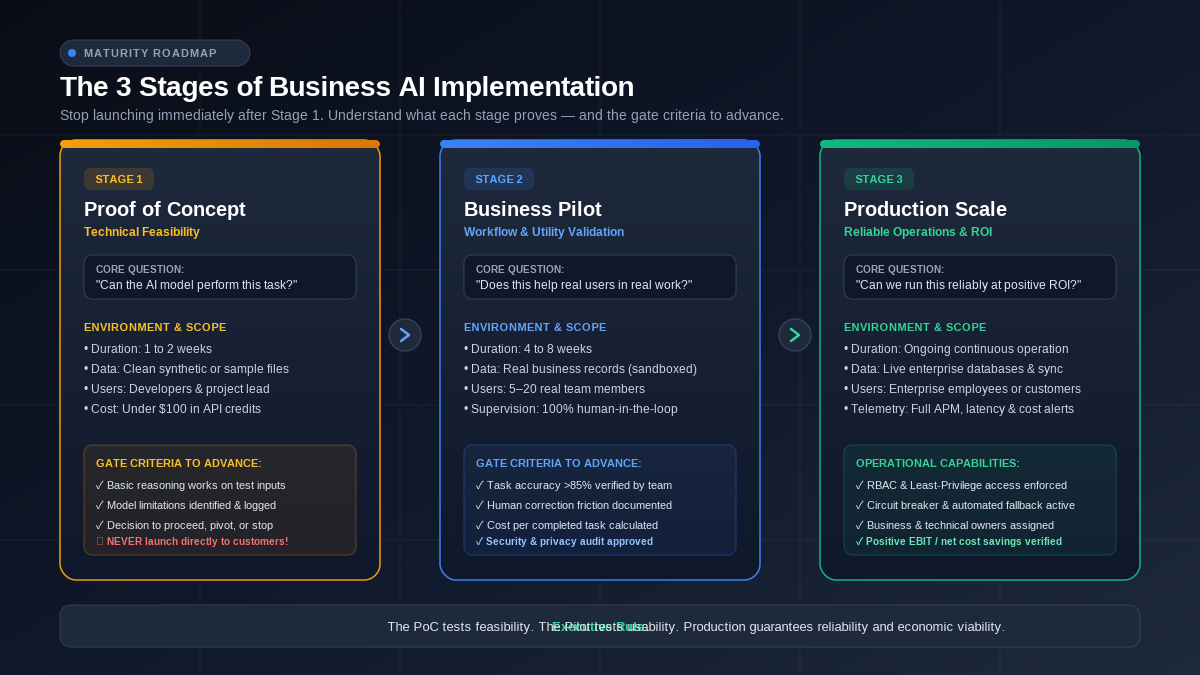
Stage 1: Proof of Concept (PoC)
Keep the scope deliberately constrained. Choose one clearly defined task and test whether the proposed AI approach can perform it.
Deliverables:
- Working prototype in a sandbox environment.
- Initial accuracy benchmarks on sample inputs.
- Documented technical limitations and model constraints.
- Preliminary API and compute cost assumptions.
- Explicit recommendation to proceed, pivot, or stop.
Never confuse a successful prototype with a completed product.
Stage 2: Pilot
Move beyond developer-controlled examples. Test with real users, approved business data, and a contained version of the live workflow.
Deliverables:
- Real-world usability testing results.
- Qualitative and quantitative user feedback.
- Verified API integrations and database connections.
- Security, RBAC, and data permission audit results.
- Measured task completion rate and error frequency.
- Calculated cost per successfully completed task.
- Documented failure modes and human escalation workflows.
The pilot should always operate with defined success criteria and an explicit end date.
Stage 3: Production Operations
Prepare the system for continuous, enterprise-wide operation.
Deliverables:
- Redundant production cloud hosting and failover mechanisms.
- Least-privilege access controls, session isolation, and encryption policies.
- High-availability API integration with automated retries.
- 24/7 APM monitoring, latency alerts, and token spend ceilings.
- Deterministic error handling and automated fallback paths.
- Human-in-the-loop oversight and escalation procedures.
- Assigned business and technical owners.
- Structured maintenance, prompt versioning, and re-evaluation schedule.
Important: The exact controls depend on application risk. A low-risk internal drafting assistant does not require the same safety architecture as an AI system executing banking transactions or diagnosing patient health records.
4. A Practical Six-Step Framework for Building Production-Ready AI
If your organization has an AI prototype that works but is not ready for deployment, follow this six-step execution framework. To map this process into a compressed timeline, consult our step-by-step roadmap on How to Plan an AI System in 7 Days.
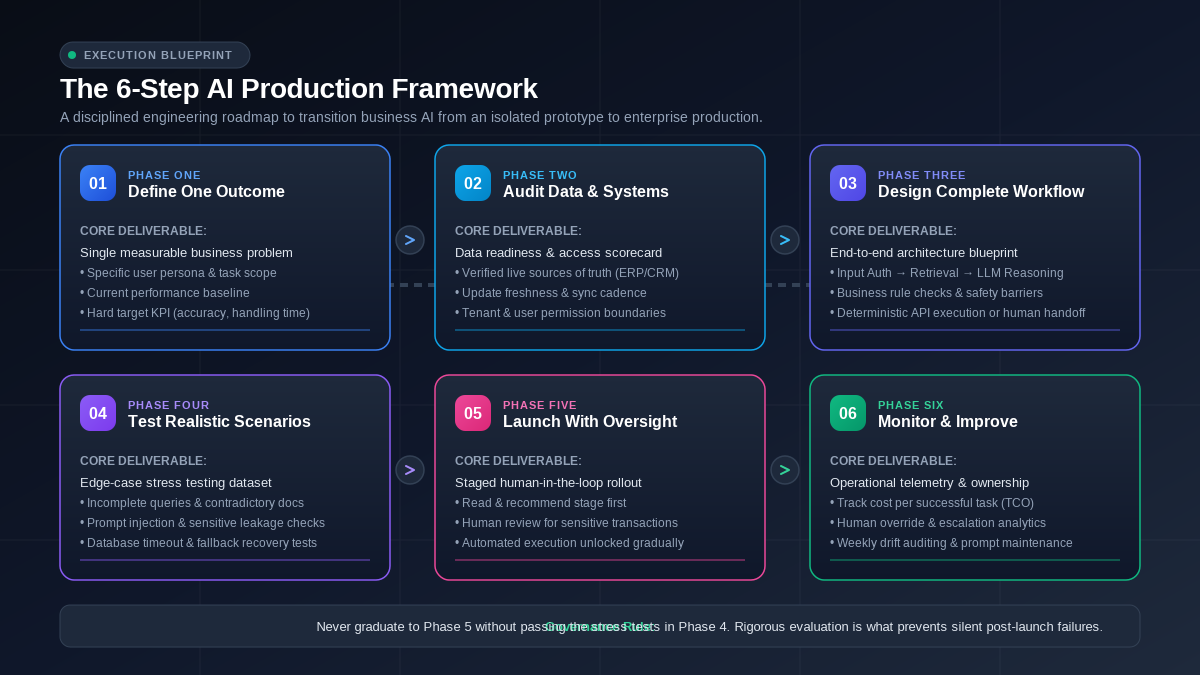
Step 1: Define One Measurable Business Outcome
Write down the exact business problem. Avoid vague ambitions such as "make the business smarter", "automate everything", or "become an AI-powered enterprise".
Instead, articulate a concrete, quantifiable target:
"Reduce the average handling time for tier-1 support inquiries by 35% through an AI assistant that retrieves approved documentation from our knowledge base, while keeping customer satisfaction above 92%."
Select metrics that reflect business value:
- Time saved per completed task.
- Workflow error and correction rate.
- First-contact resolution rate.
- Cost per completed business outcome.
- Customer satisfaction (CSAT / NPS).
- Employee adoption and utilization rate.
Always establish a historical baseline before deploying code.
Step 2: Audit the Data and Business Systems
Identify every data source required by the AI system: CRM, ERP, product catalogues, knowledge bases, document repositories, and communication channels.
Document how the AI will access each repository. Verify data quality, freshness, field consistency, access permissions, and API rate limits. Ensure that data owners are assigned and committed to maintaining source information.
Step 3: Design the Complete Workflow
Do not design only the chatbot interface or prompt template. Map the end-to-end operational pipeline:
$$\text{User Input} \longrightarrow \text{Auth & Validation} \longrightarrow \text{Context Retrieval} \longrightarrow \text{AI Processing} \longrightarrow \text{Business Rules} \longrightarrow \text{Action / Response} \longrightarrow \text{Human Review} \longrightarrow \text{Telemetry}$$
Every stage must have an unambiguous responsibility. Explicitly specify system behavior when the AI model returns low confidence, an external database times out, or an API call fails.
Step 4: Test With Realistic Scenarios
Create an evaluation dataset that reflects operational reality rather than ideal conditions. Include normal requests, missing fields, conflicting data, edge cases, prompt injection attempts, and network latency spikes.
Establish hard acceptance thresholds before launching tests. If your business requires high precision, ensure that automation is applied where it generates genuine value without introducing unnecessary complexity. For guidance on maintaining proportionate scope, review our analysis on When AI Is Overkill for Your Business.
Step 5: Launch Gradually With Human Oversight
Avoid granting an AI system autonomous execution over critical business processes on day one. Adopt a phased progression:
- Recommendations Only: The AI analyzes data and suggests drafts to employees.
- Supervised Approval: Employees review, edit, and approve suggestions before they reach customers or update databases.
- Supervised Execution: The AI autonomously handles pre-approved low-risk tasks while employees monitor exceptions.
- Gradual Scale: High-volume low-risk tasks run autonomously; high-impact or financial decisions remain strictly gated behind human approval.
This approach gives your team operational familiarity with system behavior before extending its autonomy.
Step 6: Monitor, Measure and Improve
Deployment is not the finish line. Enterprise data changes, software updates alter API schemas, user habits shift, and models drift.
Continuously track:
- Task completion and abandonment rates.
- Unsupported response frequency and hallucination rates.
- Employee override and correction frequency.
- Escalation volume and root causes.
- End-to-end response latency (p50, p95, p99).
- Token usage and infrastructure costs.
- Security events and unauthorized access attempts.
- Team adoption and sentiment.
Assign clear operational ownership for reviewing these metrics weekly and managing system improvements.
5. Example: How a Customer Support AI System Should Be Designed
To illustrate these principles in practice, examine how an e-commerce company handling thousands of daily inquiries should architect its customer support AI.
The Wrong Approach
The company builds a chatbot, uploads a PDF of general store policies, and embeds the chat widget on its homepage. The chatbot can answer basic questions about return windows, so management declares success.
However, the chatbot cannot check live order tracking, cannot access customer CRM accounts, cannot verify shipping addresses, and cannot transfer angry customers to support agents. When a customer asks "Where is my order?", the chatbot either invents a tracking status or gives a generic policy response. Frustration spikes, and human agents spend double the time resolving complaints.
The company built a chatbot demo, not a support system.
The Better Approach
The company designs the AI system around the actual support workflow:

[ Customer Touchpoint: Web / Mobile Chat ]
                   │
                   ▼
[ Authentication & Request Validation Layer ]
   • Validates active customer session
   • Checks identity & RBAC permissions
   • Sanitizes input & defends against prompt injections
                   │
                   ▼
       [ AI Orchestration Layer ]
   • Classifies customer intent (Order status vs. Refund vs. Policy)
   • Formulates structured retrieval parameters
                   │
         ┌─────────┴─────────┐
         ▼                   ▼
[ RAG Vector Base ]   [ Live Business APIs ]
Approved FAQs &       ERP, CRM & Orders DB
Shipping Policies     (Real-time status)
         └─────────┬─────────┘
                   ▼
     [ Model Reasoning & Draft Generation ]
                   │
                   ▼
[ Deterministic Business Rule Validation ]
   • Verifies order ID belongs to verified user session
   • Checks model confidence score threshold (>0.85)
   • Enforces strict refund financial caps ($100 max)
                   │
         ┌─────────┴─────────┐
         ▼                   ▼
  [ Low-Risk Case ]   [ High-Risk / Uncertain ]
  Direct Response     Escalate to Human Agent
  Sent to Customer    (AI provides pre-drafted
                      ticket summary & context)
         └─────────┬─────────┘
                   ▼
       [ Continuous Telemetry & APM ]
       Logs latency, tokens, accuracy & CSAT
What Happens in Practice?
When a customer asks: "Where is order #84920?"
- The gateway authenticates that the requesting user owns order #84920.
- The AI orchestrator calls the ERP order API to fetch real-time carrier tracking.
- The model synthesizes the live shipping details into a helpful response.
- The business rule validator verifies that no sensitive customer PII is exposed.
- The response is sent instantly: "Order #84920 was shipped via FedEx and is out for delivery today by 4:00 PM."
- If the carrier API fails or the order number is invalid, the system does not invent a date. It clearly states that the record cannot be retrieved and offers immediate escalation to an agent.
- If the customer demands a refund, the AI explains the requirements, gathers order details, and creates a pre-filled approval ticket for a human supervisor.
This is the difference between a prototype that produces impressive text and an enterprise system that reliably solves business problems.
6. Production Readiness Checklist: Is Your AI System Actually Ready?
Before authorizing an AI system for production deployment, audit your implementation against this readiness checklist:
Business Readiness
- The specific business problem is documented with a clear problem statement.
- Primary users and secondary stakeholders are identified.
- Success metrics and quantitative KPIs are established.
- A pre-deployment performance baseline exists for comparison.
- An executive business owner is formally assigned.
Data Readiness
- Live sources of truth (CRM, ERP, DB) are identified and connected.
- Data quality, schema consistency, and accuracy have been audited.
- Data update cadences and synchronization pipelines are active.
- Data access boundaries and role-based permissions are enforced.
- Sensitive business records and customer PII are redacted or encrypted.
- A dedicated data owner is responsible for repository hygiene.
Technical & Architectural Readiness
- The AI is integrated into existing business software via resilient APIs.
- Database connections, rate limits, and network latency are tested.
- Deterministic error handling, circuit breakers, and fallback paths exist.
- Response latency meets agreed SLAs under production load.
- Concurrency and traffic spikes have been validated through load testing.
Security & Governance
- User authentication and session validation are implemented.
- Least-privilege API access controls are configured.
- Sensitive, financial, or irreversible actions require human sign-off.
- Immutable audit logging captures inputs, outputs, and system actions.
- Human escalation workflows are fully tested and functional.
- Prompt injection defense and security guardrails are operational.
Testing & Evaluation
- A representative evaluation dataset of realistic scenarios is established.
- Real-world edge cases, missing data, and invalid inputs are tested.
- Hallucination rates and unsupported-answer frequencies are measured.
- External API downtime and connection failure behaviors are verified.
- Quantitative acceptance criteria are documented and signed off.
- Supervised pilot users have provided structured feedback.
Cost & Operations
- Initial development and integration costs are audited.
- Monthly model API token usage is modeled under scale conditions.
- Hosting, vector storage, and infrastructure expenses are budgeted.
- Operational maintenance and engineering responsibilities are assigned.
- Real-time APM monitoring, latency alerts, and budget caps are configured.
- A structured post-launch optimization roadmap is established.
Decision Rule: If critical requirements are missing, do not deploy to production. Narrow the deployment scope, keep the system in supervised pilot mode, or add additional human oversight until every requirement is met.
AI Demo-to-Production Readiness & TCO Calculator
Evaluate whether your AI prototype is actually ready for real business operations, and simulate the true Total Cost of Ownership (TCO) vs. expected manual savings.
A specific baseline metric (e.g. handling time, error rate) and concrete success criteria are documented.
System connects to verified live data (ERP/CRM/vector DB) with freshness guarantees, not static CSVs.
System completes full business actions (updates CRM, triggers orders) rather than isolated text generation.
System evaluated against missing inputs, conflicting data, out-of-scope queries, and malicious injections.
Sensitive/financial operations require human sign-off; audit logging and session isolation enforced.
Designated business & tech owners monitor accuracy drift, API cost per task, and system latency.
High risk of failure. This project works in a demo environment but will likely stall upon connecting to real messy business data and customer workflows.
7. How to Measure Whether Your AI Project Is Actually Successful
A common pitfall is evaluating AI success using vanity metrics: total prompt volume, user interactions, or number of automated pipelines. These indicators measure activity, not value.
To assess actual return on investment, measure the financial and operational outcomes of the underlying business process:
| Business Objective | Meaningful Outcome Metric |
|---|---|
| Improve Customer Support | First-contact resolution rate, CSAT, and escalations avoided |
| Reduce Manual Overhead | Verified labor hours saved per completed business workflow |
| Document Processing | Extraction accuracy, human correction percentage, and cycle time |
| Accelerate Sales Velocity | Qualified lead volume, conversion rate, and response turnaround |
| Internal Knowledge Discovery | Search retrieval success rate and internal employee satisfaction |
| Lower Operational Costs | Total Cost of Ownership (TCO) per successfully completed task |
| Workflow Automation | End-to-end task completion rate without human intervention |
For instance, if an AI invoice processing system handles 1,000 invoices monthly, extracts 900 accurately, and requires human adjustments on 100, measure both the 90% automation rate and the cost of the remaining 10% human corrections. Compare the total cost of the AI-augmented workflow against the historical manual process.
The objective is never to prove that AI was deployed. The objective is to prove that the business became faster, more reliable, and more profitable.
This distinction is reflected in broader industry trends. McKinsey's State of AI in 2026 report reveals that 37% of enterprise respondents attribute measurable enterprise-level EBIT improvements to AI adoption, while approximately 20% report that operating expenses constrain usage. The data underscores why technical experimentation and bottom-line financial impact must be measured independently.
8. What Successful AI Implementation Requires From Business Leaders
Building production AI is not exclusively an engineering task. While software engineers build technical pipelines, business leaders must govern what the system is expected to achieve, establish acceptable risk thresholds, and foster adoption.
A resilient enterprise AI project requires explicit ownership across seven functional domains:
| Role | Primary Governance Responsibility |
|---|---|
| Business Owner | Defines strategic objectives, approves budgets, and validates ROI |
| Technical Lead | Architects infrastructure, manages model integrations, and enforces SLAs |
| Data Owner | Guarantees data accuracy, freshness, cataloging, and repository hygiene |
| Domain Expert | Audits model responses, sets evaluation criteria, and verifies accuracy |
| Security / Compliance Officer | Audits permissions, enforces RBAC, reviews PII, and validates risk controls |
| Operations Owner | Monitors daily telemetry, tracks error drift, and manages maintenance |
| End Users | Tests workflows, provides usability feedback, and adopts the solution |
In smaller companies, one person may hold multiple responsibilities. What matters is not the size of the team, but that every responsibility has an accountable human owner. Without ownership, technical issues quickly become operational failures.
9. The Future of Business AI Is Not Just Better Models — It's Better Systems
AI models are advancing at extraordinary speed. Enterprises now have access to multimodal foundation models, powerful reasoning engines, agentic orchestration frameworks, and specialized embeddings.
Yet access to advanced intelligence does not resolve the operational reality of enterprise software. The organizations extracting durable economic advantage are combining foundation models with:
- Reliable, verified business data.
- Thoughtfully designed workflows.
- Secure, high-availability integrations.
- Granular permission boundaries.
- Continuous real-world testing.
- Guarded human oversight.
- Rigorous cost accounting.
- Proactive telemetry and monitoring.
- Sustainable organizational adoption.
As McKinsey's research emphasizes, organizations reporting the highest financial returns redesign workflows around AI capabilities rather than merely superimposing AI onto existing manual routines.
Instead of asking: "Where can we add AI?"
Executive leaders must ask:
"Which business process holds the greatest strategic leverage, and what is the safest, most reliable way to architect an AI system to transform it?"
That question shifts the focus from building impressive prototypes to building durable business systems.
Key Takeaways
- A successful demo does not equal a production deployment. Prototypes function well because they operate in controlled environments with clean, simplified data.
- Enterprise environments introduce complexity: live data drift, messy schemas, security boundaries, unexpected customer inputs, and operational costs.
- Anchor projects to business outcomes: Define a specific problem, establish a baseline metric, and evaluate task completion rather than prompt volume.
- Audit your data before writing code: Connect models to live, authenticated sources of truth rather than static snapshots.
- Stress-test edge cases: Evaluate systems against ambiguous queries, missing information, prompt injections, and network failures.
- Implement least privilege: Grant AI only the read and write permissions necessary, and keep human approval gates on sensitive transactions.
- Calculate Total Cost of Ownership: Factor in development, infrastructure, API tokens, ongoing engineering, and human review costs.
- Monitor continuously: Track accuracy drift, latency, token spend, and user adoption long after deployment.
Final Conclusion: Stop Building AI Demos. Start Building Business Systems.
An impressive demonstration can generate enthusiasm, capture budget, and excite leadership. But the true test of an AI project begins the moment the presentation ends.
Can your system navigate live corporate data? Can it interface reliably with your core software stack? Can it handle bizarre or hostile customer inquiries? Can it safeguard sensitive proprietary information? Can it operate cost-effectively at scale? Do your employees trust it? Does an operational owner monitor its performance daily?
If these questions remain unanswered, your project is still a prototype.
The difference between an expensive AI experiment and an enduring business asset is rarely the model. It is the architecture, the integrations, the governance, and the human oversight built around it.
Start with the business problem. Architect the workflow. Prepare the data. Stress-test the edge cases. Control permissions. Measure outcomes. Then scale what works.
That is how businesses move beyond fragile demos to build reliable, high-performing AI systems that deliver measurable enterprise value.
How to Plan an AI System in 7 Days: A Practical Roadmap That Actually Works
Planning AI system in a week is realistic if you follow the right order. This guide walks you through a practical, expert-tested 7-day AI planning roadmap.
Read Full GuideKey Takeaways & Common Questions
Why do AI projects fail after a successful demo?▼
AI projects often fail after a demo because prototypes operate with prepared data, limited users, and controlled scenarios. Production systems must handle real business data, integrations, security requirements, unpredictable requests, operating costs, and ongoing maintenance. A successful demonstration does not prove production readiness.
What is the difference between an AI proof of concept and an AI production system?▼
A proof of concept demonstrates whether an AI idea is technically possible. A production system is designed to operate reliably with real users and business data. Production requires testing, security, integrations, monitoring, error handling, cost management, and assigned operational ownership.
How do you move an AI project from prototype to production?▼
Start by defining measurable business outcomes. Audit data quality, map the complete workflow, integrate required systems, test realistic scenarios, introduce security and human oversight, launch a controlled pilot, and monitor performance before expanding deployment.
What is the biggest challenge in AI implementation?▼
There is no single challenge for every organization. Common barriers include poor data quality, disconnected business systems, unclear business objectives, inadequate testing, security concerns, rising costs, and weak employee adoption. The most important challenge depends on the application and business environment.
How can businesses reduce AI implementation failures?▼
Businesses can reduce failures by selecting a clear use case, preparing reliable data, integrating AI into existing workflows, defining acceptance criteria, testing edge cases, protecting sensitive information, controlling system permissions, and monitoring performance after launch.
How long does it take to move an AI prototype into production?▼
There is no universal timeline. A simple internal assistant may require considerably less work than an AI system connected to financial, healthcare, or enterprise applications. The timeline depends on data readiness, integration complexity, security requirements, testing needs, and the level of automation.
Should businesses build custom AI or use existing AI APIs?▼
Businesses should choose the simplest approach that meets their requirements. Existing AI APIs are often suitable for common language and reasoning tasks. Custom development may be justified when the business needs specialized workflows, deeper control, particular data handling requirements, or capabilities that existing products cannot provide.
How do you measure AI project ROI?▼
Compare the total cost of the AI-assisted process with its previous cost. Include development, model usage, infrastructure, integration, maintenance, and human review. Measure improvements in time, error rates, task completion, customer experience, and revenue or operating costs where appropriate.
Should AI make business decisions without human approval?▼
It depends on the risk. Low-risk, reversible tasks may be suitable for greater automation after proper testing. Financial transactions, sensitive customer decisions, and other high-impact actions may require human approval, clear authorization limits, and audit trails.
What should businesses monitor after deploying AI?▼
Monitor task completion, answer quality, incorrect outputs, user corrections, escalation rates, response time, system availability, API costs, security incidents, and employee adoption. Review these metrics regularly and update the system when business processes or data change.
Discuss your AI project with our team
Reach out to our independent research team for scoping reviews, vendor evaluations, or feedback.
Continue Reading
Handpicked research and implementation guides to deepen your understanding.
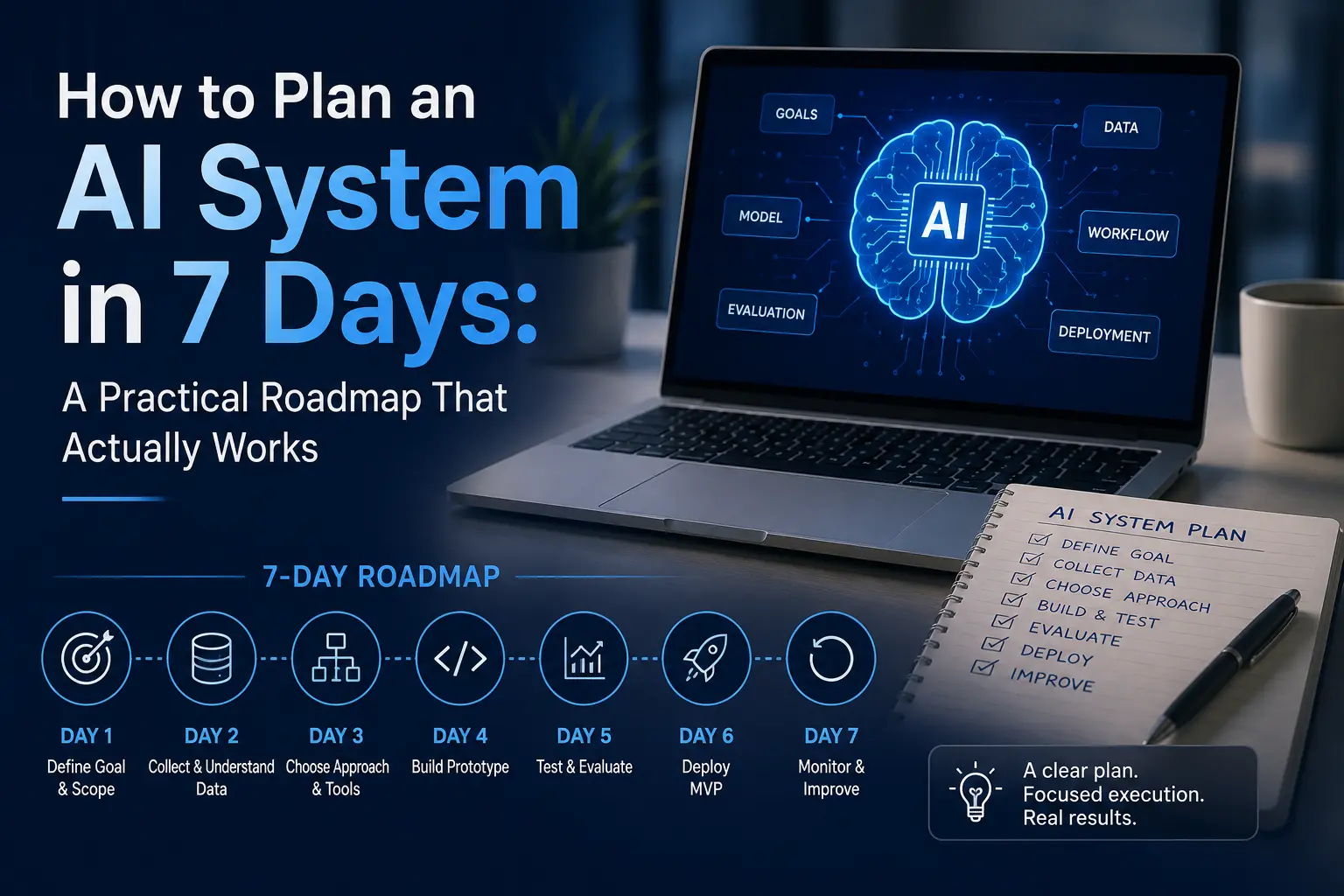
How to Plan an AI System in 7 Days: A Practical Roadmap That Actually Works
Planning AI system in a week is realistic if you follow the right order. This guide walks you through a practical, expert-tested 7-day AI planning roadmap.

What Jobs Will AI Replace by 2030? A Complete Expert Guide
Discover what jobs AI will replace by 2030, which careers are most at risk, and how to future-proof your skills with expert insights.
When Should I Use AI vs. When Should I Skip It? A Practical Guide
Learn when AI adds real business value & when it's better to avoid it. Make smarter, cost-effective decisions with this practical AI adoption guide.