How to Automate a Business Process With AI: A Practical Step-by-Step Guide
Learn how to automate business processes with AI, choose the right workflow, connect your tools, build automation, test it, and measure ROI.
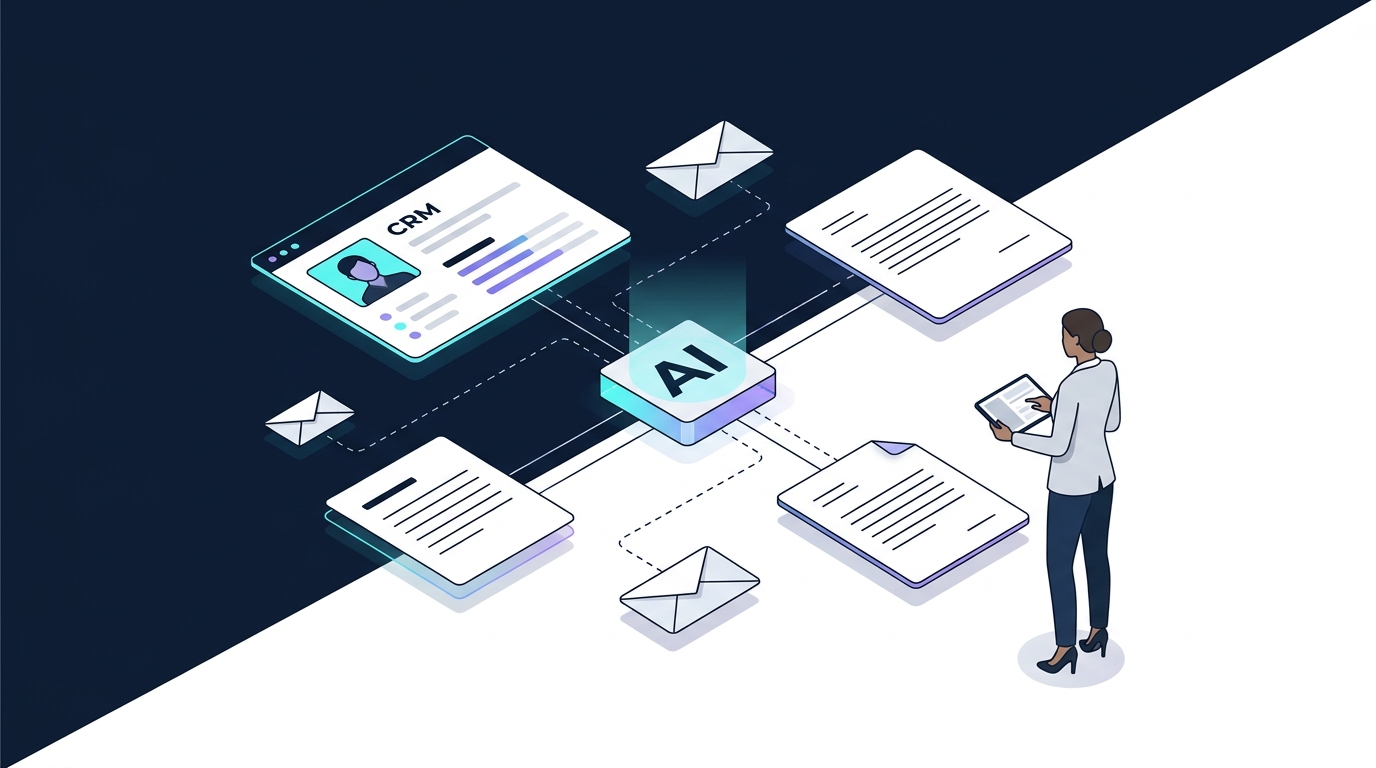
Businesses do not usually lose productivity because employees are lazy. They lose it because people spend too much time repeating the same manual work.
Someone copies customer information from a form into a CRM. Another employee reads incoming emails and forwards them to the correct department. A manager checks spreadsheets before approving requests. A sales team manually follows up with leads who contacted the company days ago.
These tasks may look small individually. Across an entire business, they create delays, unnecessary labor expenses, human fatigue errors, and missed commercial opportunities.
AI can help automate many of these processes. However, implementing AI does not mean connecting a chatbot to every application and expecting it to autonomously run your business.
The most effective AI automation starts with a business process, not an AI tool.
You need to understand how the process works, identify which steps require AI interpretation, determine which steps should follow fixed deterministic rules, connect the necessary systems, and build safeguards for situations that require human intervention.
This guide explains how to automate a business process with AI, from identifying your first high-leverage opportunity to deploying, safeguarding, and measuring a working automation.
Quick Answer: How Do You Automate a Business Process With AI?
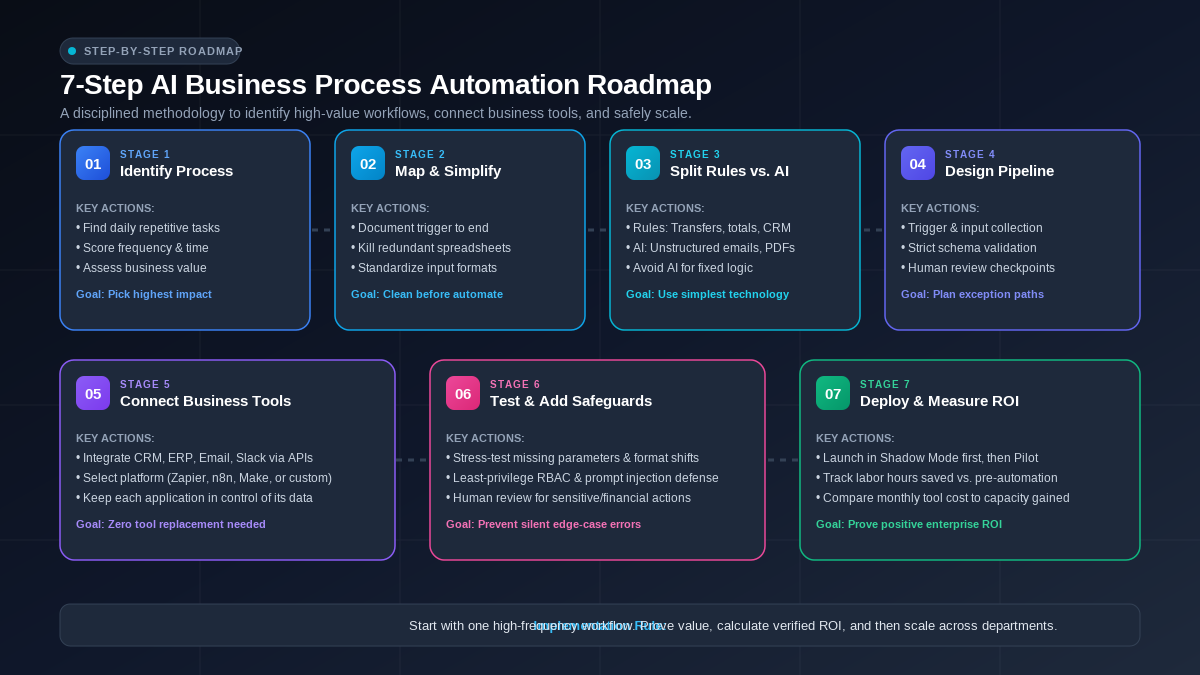
To automate a business process with AI:
- Identify a repetitive business process that consumes employee time or creates error bottlenecks.
- Document how the process currently works from trigger to final outcome.
- Remove unnecessary steps and standardize the workflow before writing code.
- Decide which steps need traditional automation and which specifically require AI interpretation.
- Connect the necessary applications, data sources, and tools via APIs or middleware.
- Build the workflow with strict schema validation, error handling, and human approval gates.
- Test it using real-world scenarios, deploy it gradually through a phased rollout, and measure business ROI.
AI is most useful when a workflow includes information that must be interpreted, such as emails, documents, customer messages, or variable requests. Traditional automation is often better for predictable actions such as transferring data, calculating totals, sending notifications, and updating records.
The best business automations combine both into a unified hybrid pipeline.
What Is AI Business Process Automation?
AI business process automation uses artificial intelligence alongside workflow automation, integrations, and business software to complete repetitive business tasks with significantly less manual involvement.
Traditional automation executes predefined, rigid instructions. AI adds cognitive capabilities such as interpreting text, extracting structured information, classifying requests, summarizing content, generating contextual responses, and assisting decisions based on situational context.
For example, a traditional automation can send an email notification whenever a customer submits a web form. An AI-powered workflow can read the customer's message, identify what they need, determine the urgency, extract their budget, summarize the request, and route it to the appropriate account executive.
The AI handles interpretation. The automation handles execution.
Traditional Automation vs. AI Automation
| Capability | Traditional Automation | AI-Powered Automation |
|---|---|---|
| Follow predefined rules | Excellent | Excellent when combined with workflow rules |
| Transfer data between systems | Excellent | Usually unnecessary to involve AI |
| Interpret customer messages | Limited | Strong core use case |
| Extract information from documents | Limited without rigid OCR templates | Highly flexible for unstructured documents |
| Classify requests | Rigid keyword conditions | Semantic, context-aware classification |
| Generate personalized responses | Static mail-merge templates | Dynamic, context-grounded drafts |
| Handle unexpected inputs | Breaks without predefined rules | Interprets variations, but requires validation |
| Make high-risk decisions | Fixed rules & threshold gates | Requires human oversight and safeguards |
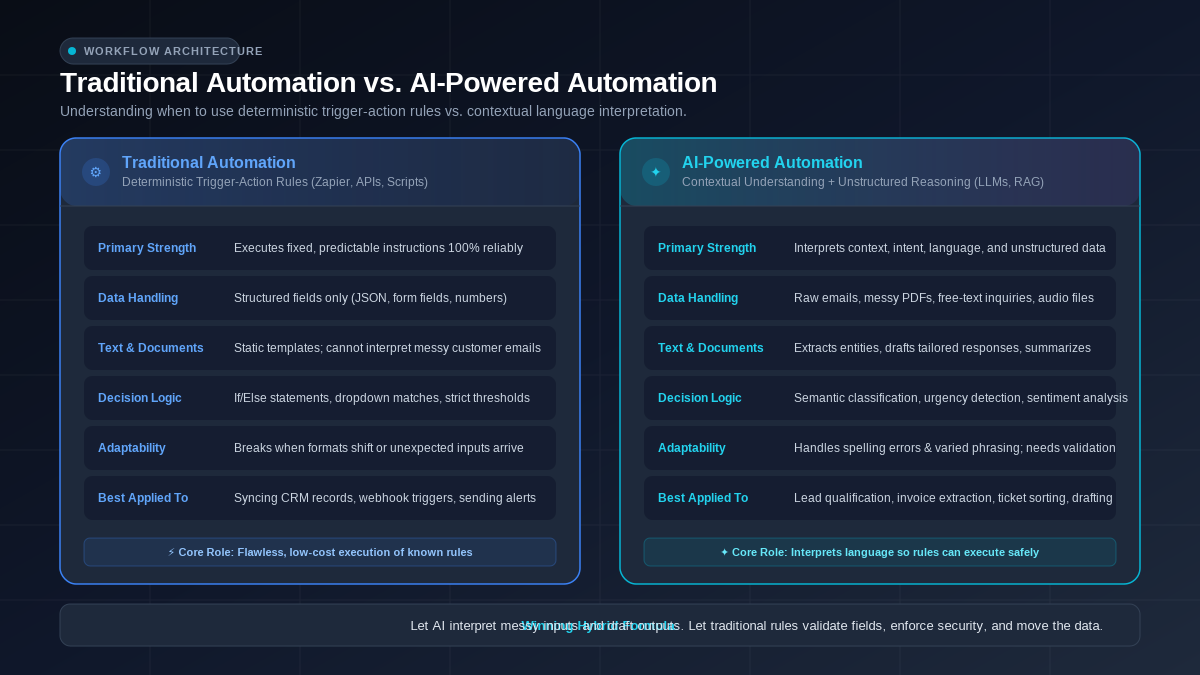
Important: AI does not replace traditional automation. It extends automation to tasks involving unstructured information, variable formats, and flexible interpretation.
1. Identify the Right Business Process to Automate
The first mistake businesses make is choosing an AI tool before identifying the actual problem.
Instead of asking:
"Which AI automation tool should we buy?"
Ask:
"Which repetitive process is costing our business the most time, money, or missed opportunities?"
Start by observing how your employees spend their daily hours. Look for processes involving:
- Repeated manual data entry
- Copying and pasting information between applications
- Reading, categorizing, and sorting emails
- Inbound customer inquiry handling
- Lead qualification and routing
- Document and PDF extraction
- Appointment scheduling and coordination
- Invoice processing and matching
- Repetitive status updates and internal notifications
Examples of Processes Worth Investigating
| Department | Repetitive Process | Potential AI Automation |
|---|---|---|
| Sales | Manually reviewing and sorting incoming leads | AI lead classification, enrichment, and CRM sync |
| Customer Support | Categorizing and routing support tickets | AI semantic classification and priority routing |
| Finance | Extracting data from vendor invoices | AI document extraction, validation, and PO matching |
| HR & Recruiting | Screening inbound job applications | Resume entity extraction and candidate categorization |
| Marketing | Aggregating weekly campaign performance | Automated data collection and narrative summaries |
| Operations | Synchronizing client records across software | Event-driven workflow integrations with validation |
| Executive | Compiling weekly cross-department updates | Automated data aggregation and executive briefing |
Do not automatically select the process with the most AI novelty. Select the process with the clearest business value and highest operational friction.
How to Score an Automation Opportunity
Use this simple scoring framework to evaluate possible processes before building anything. Score each criterion from 1 (Low) to 5 (High).
| Evaluation Criteria | Score 1 (Low Priority) | Score 5 (High Priority) |
|---|---|---|
| 1. Frequency | Happens occasionally or once a month | Happens dozens of times daily |
| 2. Time consumed | Takes little employee time | Consumes significant cumulative hours |
| 3. Process consistency | Highly unpredictable and chaotic | Mostly follows a repeatable pattern |
| 4. Business impact | Minor internal inconvenience | Directly impacts revenue, CSAT, or speed |
| 5. Data availability | Data is trapped in paper or silos | Data is accessible via APIs and databases |
| 6. Error impact | Human errors are insignificant | Data entry errors cause costly rework |
A higher composite score (24–30 points) indicates an ideal candidate for immediate automation. Use our interactive scorer below to evaluate your candidate workflows.
AI Process Opportunity Scorer & ROI Calculator
Score whether your business workflow is ready for AI automation, determine the right technology architecture, and calculate projected net monthly ROI.
How often does this workflow trigger across your organization?
Total cumulative employee hours spent manually performing this task.
Does the workflow follow a recognizable input-to-output pattern?
How significantly does slow execution or delays hurt the business?
Is the necessary information in accessible databases, CRMs, or emails?
Will eliminating human fatigue and data-entry mistakes save significant cost?
This workflow is an ideal candidate for automation. High frequency and repeatable logic mean you will see fast ROI with minimal risk. Combine an AI interpretation step (extracting text/intent) with fixed webhook actions.
2. Map the Existing Process Before Automating It
Once you identify a promising workflow, document exactly how it currently operates.
Do not automate a process that nobody understands.
A complete workflow map should clearly identify:
- What triggers the process?
- What information enters the system?
- Who handles each step?
- Which applications and databases are used?
- What decisions are made along the way?
- What conditions change the path of the workflow?
- What happens when information is missing?
- Where do delays and bottlenecks occur?
- What happens when something goes wrong?
- What is the final business outcome?
Example: Manual Sales Lead Processing
[ New lead arrives via website form ]
                 │
                 ▼
[ Employee opens the inquiry in inbox ]
                 │
                 ▼
[ Reads message & identifies requirements ]
                 │
                 ▼
[ Manually checks if lead meets criteria ]
                 │
                 ▼
[ Copies contact details into CRM ]
                 │
                 ▼
[ Assigns salesperson & writes follow-up ]
                 │
                 ▼
[ Salesperson follows up days later ]
This map reveals every manual friction point: delay in reading emails, human subjectivity in qualification, and repetitive manual typing into the CRM.
Remove Unnecessary Steps First
Suppose employees are copying information into three separate spreadsheets before entering it into a CRM. Do not automate all three spreadsheets.
Ask whether the spreadsheets are necessary at all. Could the CRM become the primary single source of truth? Could information be captured once and automatically transferred to the systems that need it?
Automation should simplify a process before making it faster. If a business has unnecessary approvals, duplicate records, confusing responsibilities, or inconsistent data, fix those organizational problems before introducing AI.
3. Decide Where AI Is Needed and Where Rules Are Better
Not every step of a business process requires artificial intelligence. A common mistake is using an expensive AI model to perform tasks that simple software can complete more accurately, deterministically, and cheaply.
Guiding Principle: Use the simplest technology that reliably solves the problem.
Technology Selection Framework
| Task in Workflow | Recommended Technology | Why |
|---|---|---|
| Send an internal notification | Traditional webhook / email | 100% predictable, zero hallucination risk |
| Transfer customer records | Direct API integration | Deterministic schema mapping |
| Calculate an invoice subtotal | Fixed business code | Math should never be left to LLM probability |
| Approve request under $100 | Workflow rule condition | Instant execution without token costs |
| Read an unstructured email | AI Language Model | Natural language reasoning is required |
| Extract data from complex PDF | AI Document Processing | Accommodates variable layouts and tables |
| Categorize customer intent | AI Classification | Understands nuance and sentiment |
| Draft personalized follow-up | Generative AI | Adapts tone and context to customer message |
| Multi-step contextual tool use | AI Agent (with controls) | Selects tools dynamically based on discovery |
| High-risk financial transfer | Rules + Human Approval | Zero tolerance for autonomous errors |
To determine whether your specific use case requires probabilistic intelligence or deterministic code, read our strategic guide on when to use AI vs traditional automation.
Example: Hybrid Invoice Processing
An invoice automation workflow should combine multiple technologies:
- Email Integration (Traditional): Detects incoming email with PDF attachment.
- AI Document Extraction (AI): Extracts vendor name, invoice number, line items, and totals from unstructured PDF.
- Validation Rules (Code): Confirms required fields are present and math checks out.
- Database Match (Traditional API): Compares line items against the open Purchase Order in the ERP.
- Exception Gate (Rules): If mismatch > 2%, routes to finance manager.
- Manager Approval (Human): Manager clicks "Approve Payment" on mobile.
- Accounting Record (API): Software logs payment in QuickBooks / NetSuite.
AI handles document interpretation. Rules handle verification. A human handles financial authorization. This hybrid design is vastly more reliable than asking an autonomous agent to run your financial operations unsupervised.
4. Design the AI Automation Workflow
Now convert the process map into an automation architecture. Every workflow must define its trigger, inputs, processing steps, actions, validation, exception handling, and final outcome.
The Basic AI Automation Architecture
[ TRIGGER ]
     │
     ▼
[ INPUT COLLECTION ]
     │
     ▼
[ DATA VALIDATION ]
     │
     ▼
[ AI PROCESSING (Context & Interpretation) ]
     │
     ▼
[ RULES & DECISION LOGIC ]
     │
     ▼
[ HUMAN APPROVAL (When Threshold Exceeded) ]
     │
     ▼
[ ACTION EXECUTION (APIs, CRM, Email) ]
     │
     ▼
[ RECORD, AUDIT & ERROR HANDLING ]
What Each Component Does
- Trigger: Defines when automation starts (new webhook, form submission, email arrival, scheduled cron job, or database update).
- Input Collection: Gathers necessary contextual records (customer CRM profile, document text, purchase history, knowledge base policies).
- Data Validation: Pre-validates inputs before making expensive AI calls (verifies valid email syntax, checks attachment integrity, verifies customer exists).
- AI Processing: Uses AI specifically where cognitive value is added: entity extraction, classification, sentiment detection, or response drafting.
- Rules & Decision Logic: Controls deterministic branching (if priority == "high", page account executive; if confidence < 85%, route to manual review).
- Action Execution: Executes confirmed business changes via authenticated APIs (creates CRM record, sends draft, updates ticketing software).
- Monitoring & Error Handling: Logs full payload telemetry and alerts on-call staff if an API times out. A workflow must never fail silently.
For a comprehensive scoping roadmap on planning this architecture within a one-week sprint, consult our blueprint on how to plan an AI system in 7 days.
5. Connect AI to Your Existing Business Software
AI automation becomes commercially viable when it connects directly to the systems your business already relies on every day.
Depending on your workflow, integrations may include:
- CRM platforms (HubSpot, Salesforce)
- ERP and accounting systems (NetSuite, QuickBooks, Xero)
- Customer support desks (Zendesk, Freshdesk, Intercom)
- Communication channels (Slack, Microsoft Teams, Gmail, Outlook)
- Project management tools (Asana, ClickUp, Jira)
- Internal databases (PostgreSQL, MongoDB, Snowflake)
Common integration mechanisms include REST/GraphQL APIs, secure webhooks, native middleware connectors, and authenticated database connectors.
[ Customer Submits Web Form ]
               │
               ▼
   [ Automation Middleware ]
   ├── AI Model: Analyzes intent & extracts requirements
   ├── CRM API: Creates / updates customer account
   ├── Email Service: Prepares draft response
   ├── Routing Engine: Assigns sales representative
   └── Slack Webhook: Alerts account executive in real time
The AI model does not need to own or replace every system. The integration layer coordinates the pipeline, while each core business application remains responsible for its own data governance.
For detailed strategies on integrating AI agents without disrupting active team operations, read our guide on how to connect AI to your existing business software. In their enterprise research, Microsoft's framework for building business process agents highlights that integration with established system-of-record APIs is the single greatest determinant of operational success.
6. Build Your First AI Automation: Lead Qualification Walkthrough
The best way to start is with a focused, production-grade version of one workflow. Do not attempt to automate an entire business unit on day one.
Consider an inbound sales lead qualification pipeline for a B2B SaaS company:
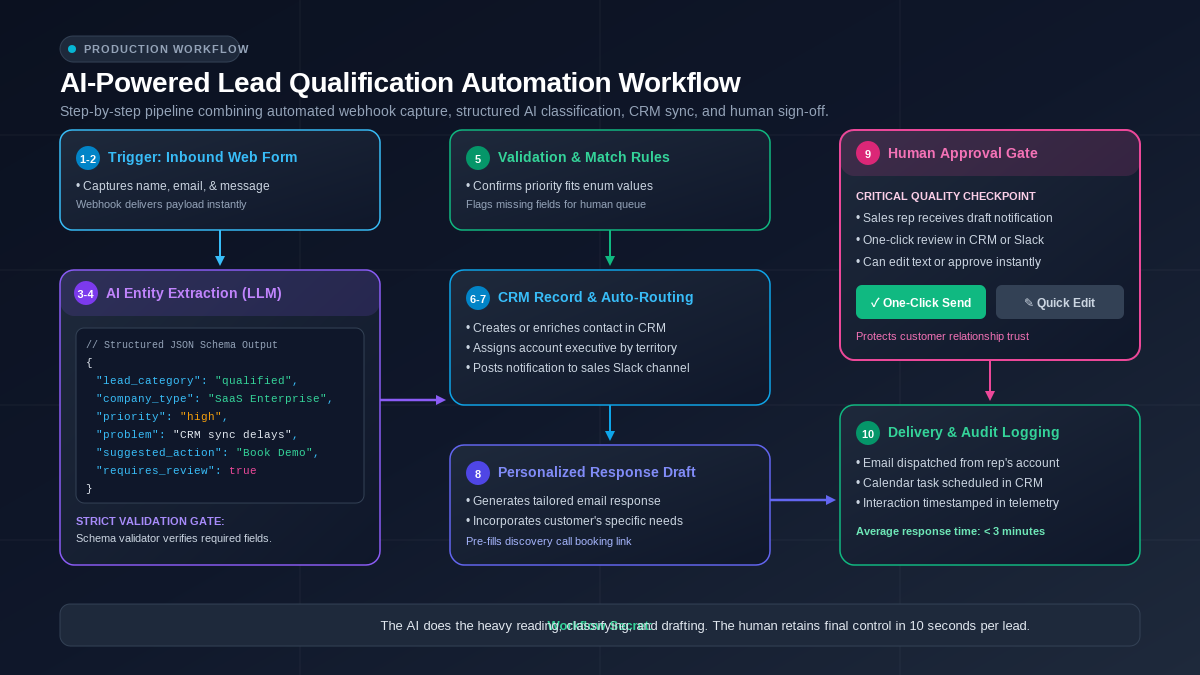
The 10-Step Automated Pipeline
- Step 1: Inbound website inquiry received via contact form.
- Step 2: Automation middleware captures contact details and message body.
- Step 3: AI model evaluates customer inquiry text against company qualification rules.
- Step 4: AI returns strictly typed JSON data containing company type, main problem, product interest, lead category, summary, and suggested next action.
- Step 5: Validation rules inspect output schema (rejecting invalid priorities or missing fields).
- Step 6: CRM record is created or updated in HubSpot/Salesforce.
- Step 7: Lead is automatically assigned to a sales rep based on territory rules.
- Step 8: AI drafts a personalized follow-up email addressing the prospect's exact requirements.
- Step 9: Salesperson receives Slack/CRM alert, reviews the draft, and approves or edits it in 10 seconds.
- Step 10: Response is dispatched, and interaction history is logged in the CRM.
Example Structured AI Output
{
  "lead_category": "qualified",
  "company_type": "SaaS Enterprise",
  "problem": "Manual CRM data entry delays and slow lead response time",
  "priority": "high",
  "summary": "The prospect has 50 reps manually entering lead data and wants an AI-driven automated qualification and CRM routing workflow.",
  "suggested_action": "Schedule a 30-minute discovery call",
  "requires_human_review": true
}
This structured format allows the automation platform to inspect explicit fields rather than trying to parse a vague prose paragraph.
Production Prompt Template
You are an enterprise sales qualification assistant.
Analyze the provided customer inquiry.

Extract:
- Company type
- Primary business problem
- Specific product or service requested
- Lead qualification category (qualified, unqualified, spam, existing_customer)
- Urgency priority (low, medium, high)
- A 2-sentence executive summary
- Recommended next operational action

Rules:
1. Rely strictly on facts stated in the customer inquiry and the supplied qualification criteria.
2. Do not hallucinate or invent missing contact or company information.
3. If information is absent or ambiguous, return "unknown".
4. Do not make commercial, contractual, or pricing promises.
5. Return the result exclusively using the required JSON schema.

Customer inquiry:
{{inquiry_text}}

Qualification criteria:
{{qualification_rules}}
7. Choose the Right AI Automation Tools
The right tooling depends on your existing tech stack, engineering capabilities, security compliance, and budget. You do not need to purchase an enterprise RPA suite to automate a simple workflow.
Tool Categories
| Tool Category | Best For | Popular Examples |
|---|---|---|
| No-code automation | Connecting cloud apps with visual builders | Zapier, Make |
| Low-code automation | Complex conditional logic & self-hosting | n8n, Microsoft Power Automate |
| AI model APIs | Extraction, classification, summarization | OpenAI API, Anthropic Claude, Google Gemini |
| RPA (Robotic Process Automation) | Automating legacy web/desktop interfaces | UiPath, Automation Anywhere |
| Custom code | High-volume proprietary workflows | Python, Node.js, FastAPI |
| AI agent frameworks | Tool-using multi-step autonomous workflows | LangGraph, LlamaIndex, CrewAI |
(Note: Tool names are illustrative examples, not commercial endorsements. Always verify pricing and security posture.)
Platform Decision Matrix
- Choose Zapier or Make when: You want to connect standard SaaS apps quickly without technical developers, your logic is linear, and you need to launch in days. As outlined in Zapier's practical business automation guide, no-code platforms allow operations teams to prototype AI steps without engineering tickets.
- Choose n8n when: You require complex branching, privacy-compliant self-hosting on your own cloud servers, and flexible webhook manipulation without per-task pricing penalties.
- Choose Microsoft Power Automate when: Your organization runs on Microsoft 365, SharePoint, Teams, and Outlook, requiring native Active Directory permissions.
- Choose Custom Code when: The process is central to your intellectual property, handles extreme transaction volumes, or requires specialized microsecond latency.
- Choose an AI Agent framework when: The next action depends dynamically on discoveries made during execution, requiring multi-step reasoning. To explore agent architectures in detail, review our guide on AI agent workflow automation.
8. Test the Automation Before Deploying It
A workflow that succeeds on one clean example in testing is not ready for production. Real business environments bring missing information, duplicate submissions, system timeouts, and unexpected prompt variations.
AI Automation Testing Checklist
| Test Scenario | Expected System Behavior |
|---|---|
| Standard clean input | Workflow completes successfully from trigger to delivery |
| Missing required fields | Validation flags omission and requests clarification or review |
| Duplicate submissions | Idempotency key prevents duplicate CRM records or double-billing |
| Ambiguous customer text | AI marks confidence as low and routes to human inbox |
| Third-party API downtime | Exponential retry logic activates; alerts on-call team after 3 tries |
| Malformed AI output | Schema validator rejects payload and triggers fallback |
| High-risk transaction | Strict authorization checkpoint halts execution until manager approves |
| Unauthorized access attempt | Identity gateway blocks request with 403 Forbidden |
| Prompt injection attempt | Input sanitizer strips instructions attempting to bypass rules |
Collect historical edge cases from your past customer interactions. As G2's process automation implementation methodology demonstrates, testing edge cases before launch prevents the operational stall that derails unmonitored systems. For a deep dive into avoiding post-demo collapse, see our analysis on why business AI projects fail after the demo.
9. Add Security and Human Approval
AI automation introduces operational and legal risks if connected to customer PII, financial databases, or external communication channels without safeguards.
Essential Security Safeguards
- Least-Privilege API Scopes: Grant your automation only the specific read and write permissions needed. A customer qualification bot has no business accessing payroll records.
- Human Approval Gates: Mandate human sign-off for sensitive actions: issuing customer refunds, deleting records, signing contracts, or sending external emails with contractual commitments.
- Data Protection & Zero-Data Retention: Configure enterprise API agreements so your proprietary customer records are not stored or used to train public foundation models.
- Immutable Audit Logging: Record every trigger event, input payload, model response, rule evaluation, and user approval for compliance auditing.
- Prompt Injection Defense: Treat all user-submitted messages, emails, and uploaded documents as untrusted inputs. A document must never be able to instruct your automation to bypass system rules.
- Graceful Failure Recovery: Implement automated retries, alert webhooks, and manual fallback queues so business operations continue smoothly even if an AI provider experiences downtime.
These safeguards align directly with the governance standards published in the NIST Artificial Intelligence Risk Management Framework, providing a reliable foundation for enterprise compliance.
10. Measure the Business ROI of AI Automation
Automation is not successful simply because a process runs without human intervention. It must produce verifiable business value.
Establish a performance baseline before launching your automation. Record:
- Average manual handling time per task
- Monthly volume of inquiries or transactions
- Fully loaded hourly cost of employees
- Historical error or rework rate
- Turnaround delay from inquiry to resolution
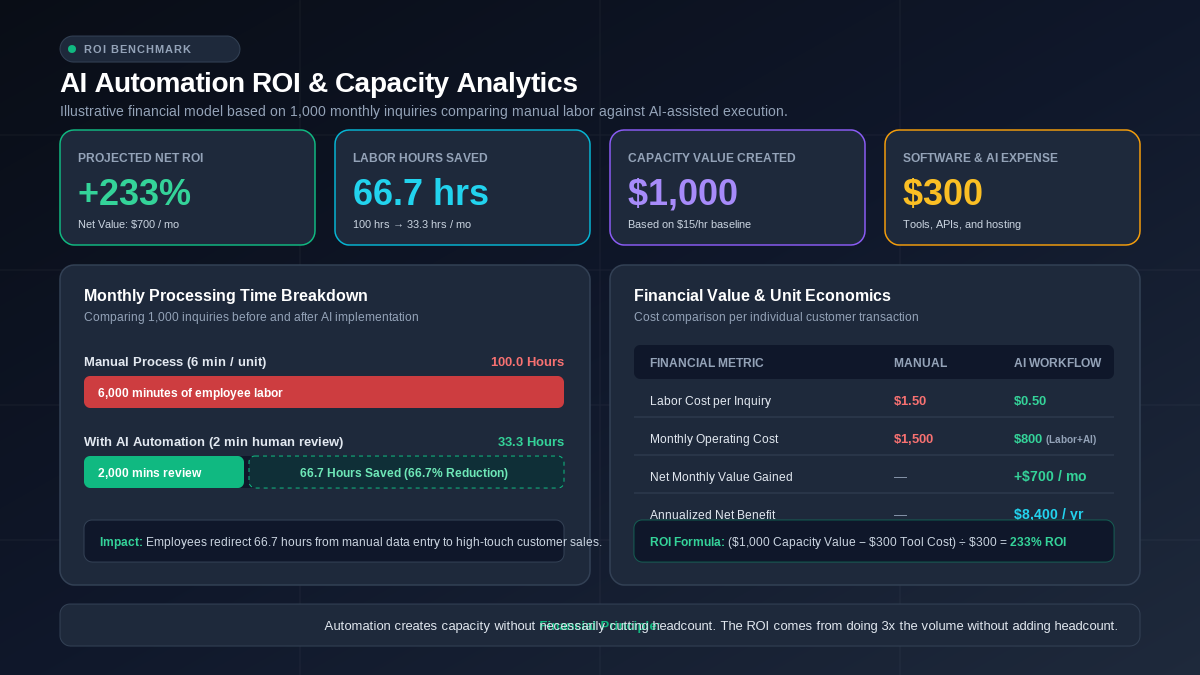
Monthly Automation ROI Case Example
Assume a mid-size company processes 1,000 customer inquiries each month.
Pre-Automation Manual Baseline:
- Average manual processing time: 6 minutes
- Monthly inquiries: 1,000
- Total manual time: 6,000 minutes (100.0 hours)
- At $15/hr labor cost: $1,500/month
Post-Automation Workflow:
- Average human review time with AI draft: 2 minutes
- Monthly review time: 2,000 minutes (33.3 hours)
- Monthly human review cost: $500/month
Net Gains:
- Labor Hours Saved: 100 − 33.3 = 66.7 hours per month
- Labor Capacity Value Gained: 66.7 × $15 = $1,000/month
- Monthly Software & AI Tool Cost: $300/month
- Net Monthly Value: $1,000 − $300 = $700/month
- Annualized Net Savings: $8,400/year
ROI Calculation Formula
$$\text{ROI} = \left( \frac{\text{Capacity Value Created} - \text{Operating Cost}}{\text{Operating Cost}} \right) \times 100$$
$$\text{ROI} = \left( \frac{$1,000 - $300}{$300} \right) \times 100 = 233.3%$$
(Note: These figures are illustrative models. Actual returns depend on your baseline labor costs, tool subscriptions, and whether saved employee hours are redirected into revenue-generating work.)
Automation creates capacity without necessarily cutting headcount. The primary ROI comes from scaling operational volume 3x without having to hire additional staff.
11. Deploy Gradually and Improve the Workflow
Once your automation passes testing, do not immediately dismantle your manual process. Deploy using a controlled, phased progression:
- Phase 1: Shadow Mode (Week 1–2): The automation executes silently in the background while employees follow the existing manual process. Compare automated outputs against human decisions to detect discrepancy patterns.
- Phase 2: Supervised Approval (Week 3–4): The AI extracts information and drafts responses, but a designated human employee must review and click "Approve" before any action is committed.
- Phase 3: Limited Autonomous Execution (Month 2): Low-risk, high-confidence actions (>95% certainty) execute autonomously. Ambiguous tasks and policy exceptions remain routed to human queues.
- Phase 4: Full Scale (Month 3+): Expand the workflow across additional departments, higher transaction volumes, and new customer channels.
- Phase 5: Continuous Optimization: Review monthly audit logs to refine prompt instructions, update integration schemas, and eliminate edge-case errors.
Common AI Automation Mistakes to Avoid
- Automating a broken, disorganized process: If your manual workflow is chaotic, automation only generates errors faster. Clean the process before applying software.
- Using AI where simple rules work better: Never use an LLM for predictable math, simple data transfers, or binary if/else logic. If you are unsure where automation crosses into needless complexity, read our analysis on when AI is overkill for your business.
- Choosing tools before defining requirements: Selecting an expensive platform before documenting your workflow leads to costly vendor lock-in.
- Ignoring edge cases and exceptions: Real operations involve missing inputs, corrupt attachments, and unusual requests. Design exception queues on day one.
- Granting AI unrestricted permissions: Never give an AI script administrative database access or unrestricted outbound emailing authority. Enforce least privilege.
- Failing to track business ROI: Measure time saved and error reductions against your baseline, not just total prompt counts.
Final Takeaway
AI business process automation is not about replacing your entire workforce or handing your company over to autonomous bots.
It is about eliminating repetitive, soul-crushing data entry, accelerating operational velocity, reducing costly human errors, and empowering your team to focus on high-leverage work: strategy, complex problem-solving, and building authentic customer relationships.
The winning formula is straightforward:
Identify the problem. Map the workflow. Simplify the steps. Select the right technology. Build safety guardrails. Test with real edge cases. Measure verified ROI. Scale what works.
Start with one workflow that causes clear operational friction today. Build a lean, reliable automation, verify its business value, and let those measurable results guide your next implementation.
How to Build AI Agents Without Coding: The Complete 2026 Guide for Beginners and Business Owners
Learn how to build AI agents without coding using the best no-code platforms in 2026. Step-by-step guide for beginners, freelancers & business owners.
Read Full GuideKey Takeaways & Common Questions
How can I automate business processes with AI?▼
Identify a repetitive process, document its steps, determine where AI is useful, connect the necessary software, build a workflow with validation and safeguards, test it, deploy gradually, and measure results.
What business processes are best for AI automation?▼
Processes involving repetitive work and variable information are often strong candidates. Examples include lead qualification, document processing, email classification, customer support routing, report preparation, and information extraction.
Can I automate business processes without coding?▼
Yes. No-code and low-code platforms can connect applications, create triggers, add conditions, and incorporate AI steps. More complex workflows may require APIs or custom development.
What is the difference between AI automation and workflow automation?▼
Workflow automation executes predefined steps and rules. AI automation adds capabilities such as interpreting unstructured information, classifying content, generating responses, or making context-dependent recommendations.
Do I need AI agents to automate my business?▼
No. Most business processes can start with a conventional workflow and selected AI steps. AI agents are more useful when tasks require flexible decisions and tool selection across multiple steps.
How much does AI business process automation cost?▼
Costs vary based on workflow complexity, software subscriptions, AI usage, integration requirements, development, maintenance, and security needs. Simple workflows can start with low-cost no-code tools, while custom enterprise integrations require ongoing compute, monitoring, and engineering investment.
Is AI automation safe for business data?▼
It can be implemented securely, but safety depends on data handling, permissions, model-provider retention policies, validation, monitoring, and the sensitivity of the information being processed. Never grant unrestricted admin access to business databases.
How long does it take to automate a business process?▼
A simple workflow connecting two applications may take hours or days to configure and test. Complex workflows involving custom integrations, AI processing, approval systems, and security reviews can take weeks or longer.
How do I measure the success of AI automation?▼
Measure time saved, processing speed, error rate, cost per transaction, exception rate, accuracy, customer experience, and business outcomes compared against your historical pre-automation baseline.
What should I do if an AI workflow makes a mistake?▼
Design exception handling and human approval gates upfront. When an AI step returns low confidence or an invalid schema, route the task immediately to a human supervisor rather than allowing it to write bad data into business systems.
Discuss your AI project with our team
Reach out to our independent research team for scoping reviews, vendor evaluations, or feedback.
Continue Reading
Handpicked research and implementation guides to deepen your understanding.

How to Build AI Agents Without Coding: The Complete 2026 Guide for Beginners and Business Owners
Learn how to build AI agents without coding using the best no-code platforms in 2026. Step-by-step guide for beginners, freelancers & business owners.
How AI Agent Workflow Automation Is Changing Software Development Forever
Discover how AI agent workflow automation is transforming software development with faster coding, testing, and deployment.

Integrate AI Into Human Workflows | 2026 Guide
Stop replacing, start empowering. Learn how to integrate AI into human workflows to boost efficiency by 40% and keep your team engaged. Practical steps inside.